How to create a loop
A practical build sequence for turning a repeating AI task into a loop that remembers, stops at the right boundary, and starts the next cycle smarter.
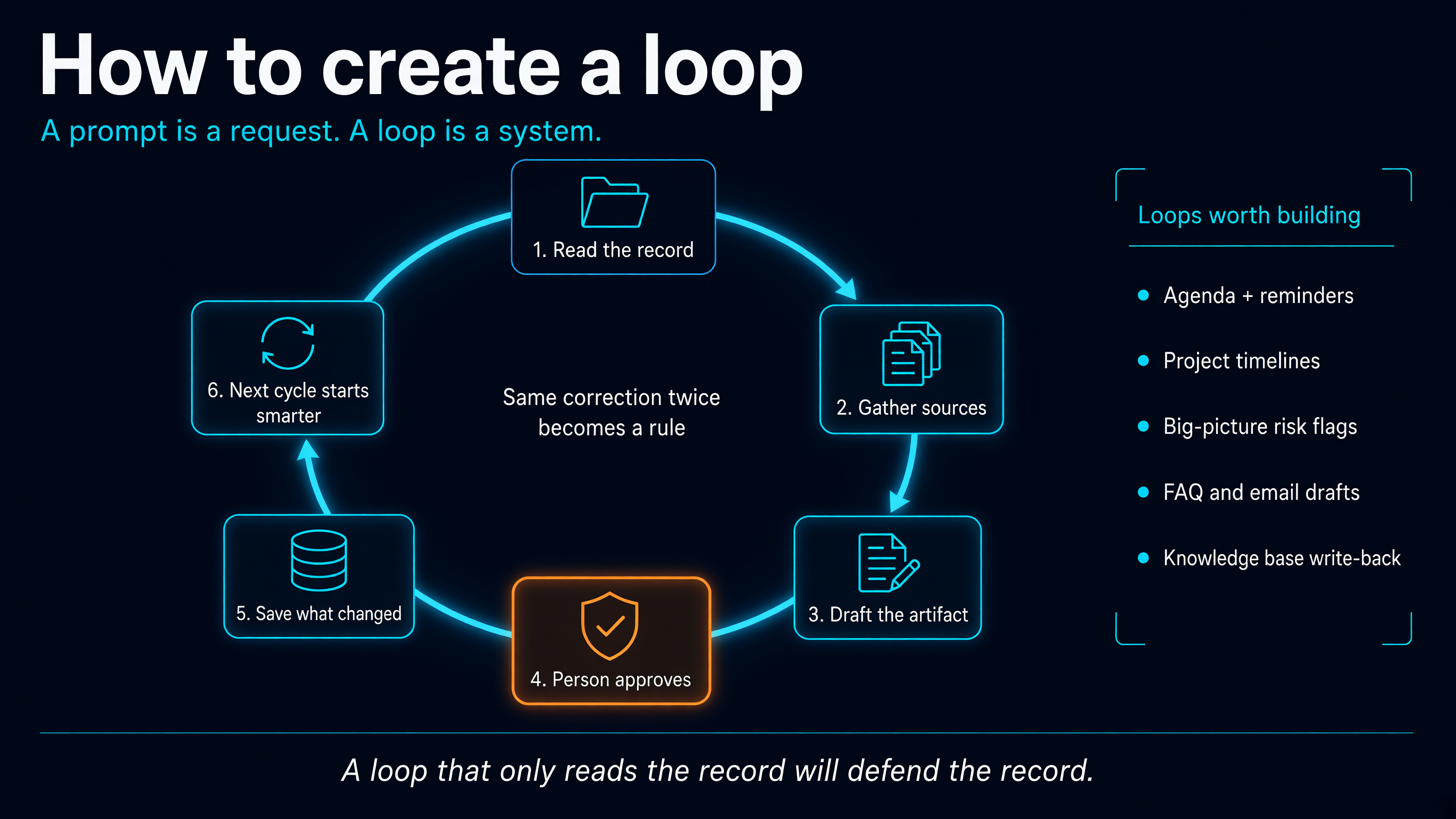
In June I wrote that a prompt is a request and a loop is a system.
People agreed with that. Then they asked the obvious follow-up.
Fine. How do I build one?
This is my answer. It pulls from three places: the loop I published in June, a project hub prompt I have been using since, and a run of Nate B Jones videos that name the pattern better than most of the vendor decks I sit through.
Start with the work nobody counts
Nate made a point this summer that stuck with me. Apps made every piece of work easy to reach and left the wiring between them to you. The email is in one place. The calendar is in another. The notes are somewhere else. The job of noticing that one change moves three other things lives in your head.
That wiring is the work. Nobody logs it.
In a school district, that is most of the week. Board prep. Vendor follow-up. Enrollment questions. Project updates that have to match what was said in the last meeting and not what someone remembers was said.
His ladder is simple, and it is worth stealing:
- A prompt is one request.
- A loop is one recurring job with memory.
- A loop of loops is recurring jobs that notice each other, share what changed, and stop at your boundaries.
Most people are still on the first rung. That is fine. The second rung is where the time comes back.
My first loop was a meeting
The loop I wrote about in June did not start as an AI strategy. It started as a standing project meeting that kept losing its own history.
So I mapped it as before, during, and after.
Before the meeting, the system gathers the current state. During the meeting, people make decisions. After the meeting, the system updates the record. Before the next meeting, the updated record becomes the context.
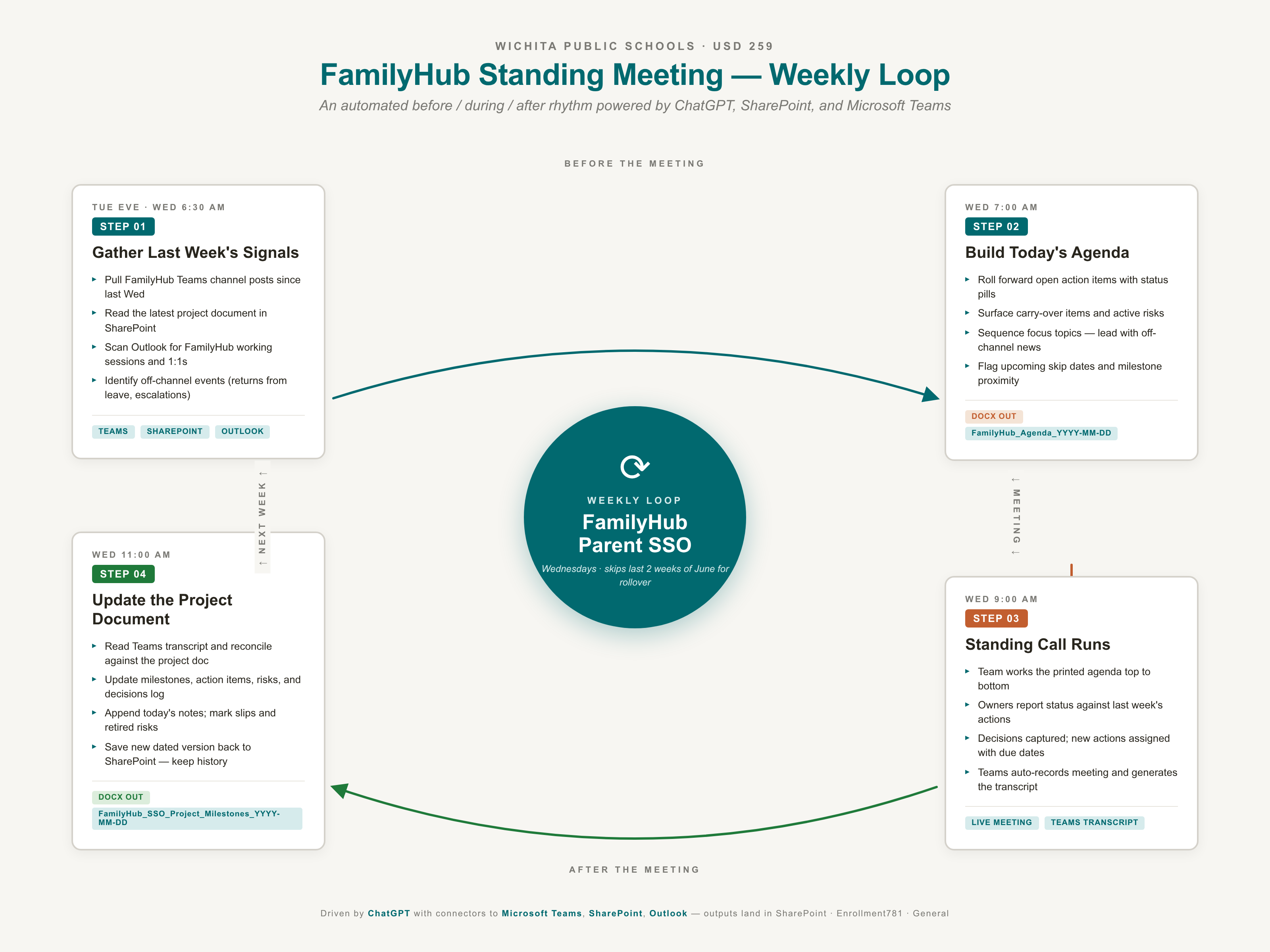
The six steps underneath it:
- Pull the current state from the canonical project record.
- Pull new signal from meetings, messages, emails, and notes.
- Compare the new signal against the record.
- Update the record in place. No duplicates.
- Write a short change summary for humans.
- Save the artifact so it starts the next cycle.
Step five is the one people skip. A beautiful document with no delta still makes a leader read everything to find out what moved.
Both June templates are still up if you want the meeting-shaped version:
The build sequence
Here is how I would build a loop today, from nothing.
1. Pick one job that repeats
Not your whole life. Not your whole department. One job that is annoying and valuable.
Nate's list is good here: turn this transcript into a brief, organize this source folder, prepare my day from calendar and email, check this package and tell me what is missing.
If it does not repeat, write a prompt and move on.
2. Name the record
Every loop needs one place where the state lives. A project doc. A tracker. A running brief.
If the state lives in three places, you do not have a loop. You have three drafts that will disagree next week.
3. Name the sources, and what to ignore
What does it read every time? What does it skip?
Reactions, pleasantries, and duplicate chatter are noise. Last week's decision log is not.
This is where most of the quality comes from. Not the model.
4. Define the artifact and the standard
What comes out, in what shape, and what does good look like?
Nate boils a delegated job down to five things: a goal, sources, a standard, a permission boundary, and proof that it is done. That list is the whole spec. Most prompts give one of the five.
5. Set the boundary
What can it do without asking? Where does it stop? What needs a person?
The safe first loops draft and stop. They do not send. They do not delete. They do not approve anything.
A loop that never asks is dangerous. A loop that asks about everything is a worse intern.
6. Require the change summary
Every cycle ends with: what is new, what changed, what conflicts, what needs a decision.
That is the piece a leader actually reads.
7. Save what changed, and what you corrected
This is the memory. The next run starts from it.
Nate's rule here is one I now use daily. When you give the same correction twice, stop correcting. Make it a standing instruction, a skill, or a saved rule.
8. Only then, connect loops
Once two loops are stable, let them notice each other. The meeting loop tells the project record loop what was decided. The project loop tells the board prep loop what slipped.
That is the loop of loops. Build it last, not first.
The jobs Jenn named
Jenn Womble gave me the list I wish more people would send. Not a model preference. The jobs.
Agenda building. Meeting reminders. Personal notes and feedback. Project timelines. A standing look at the big picture, early enough to see a change before it snags the work. Staff answers to the questions that keep arriving, and the emails that go with them.
Agenda building is the June loop. The template is already up. The reminder is the missing half: the loop notices the meeting is coming, builds the agenda from the record, and puts it in front of the people who need it. Then it stops. It does not chase the room on its own.
Personal notes and feedback are the trap. A loop can pull the last decision, the open item, and the thing that person actually said. It cannot supply the care. Draft the note. You send it. If the personal line could have gone to anyone on the list, delete it.
Timelines belong in the project hub below. One record. Dates with sources. When a date slips, the change summary says so.
That is also the big-picture analyst. Predict, in this job, means a standing comparison of the plan against what just came in. Aging blockers. Conflicting dates. A milestone that moved while the brief stayed still. Flag it before the meeting. A loop that only re-reads last quarter will defend last quarter. You still decide which flag is the real snag.
Staff FAQ replies and email drafts use the same stop. The sources are the approved answers, not the model's memory. Draft the reply. A person sends it. Do not let a loop answer a parent, a staff member, or a vendor without that stop.
Six jobs. Build one. I would start with the agenda, because the template already exists and the meeting is going to happen either way.
The knowledge base has to loop
Sabba Quidwai named the layer under that list. The knowledge base, and how that loops. She also said hers still feels weak.
That is the normal state. The work dies in the chat, and the record never gets the write-back.
Every job above reads something first. The agenda reads the project record. The reminder reads the calendar and the last meeting. The personal note reads what that person actually said. The timeline reads the dates. The FAQ reply reads the approved answer. If that record is thin, every loop above it is guessing.
A knowledge base gets stronger only when the loop writes back.
A source comes in. A meeting. A correction. An email you decided mattered. An article you will actually use. You keep it or you drop it. What you keep goes in one place, with a date and a source. The next loop reads that place first. When the loop is wrong, the correction goes back into the record. That write-back is the loop. Without it, you have a pile.
It stays weak in three familiar ways. You save everything, so nothing is findable. You save nothing, so every Monday starts from zero. You save it in the chat, and closing the tab resets the loop.
The test I use: if you switched tools tomorrow, what would you still have? If the answer is the chat history, you rented the memory.
The project hub below is the small version. One project. One brief. A source register. Point that same habit at the work you carry across projects, and you have the knowledge base Sabba is talking about.
Start with one project, and one correction you are tired of giving. Put it where the next run will read it.
The project hub prompt
This is the project management version I use now. Where the June templates were shaped around a meeting, this one is shaped around the project itself. It keeps one living brief, and every new source goes through the same update loop.
What makes it work is not the length. It is the rules.
It separates facts from decisions from assumptions from risks. It keeps a source register so nobody has to ask where a claim came from. It flags conflicts instead of quietly picking a winner. It refuses to invent dates, owners, budgets, or approvals. It keeps student, employee, and financial details out unless the source supports them.
And every time new material arrives, it runs the same seven steps.
Copy it. Fill in the brackets. The brackets are where the engineering happens.
```text You are my Project Hub Coordinator for: [PROJECT NAME].
Your job is to maintain a single, reliable project brief by connecting and synthesizing the sources I provide. Treat this conversation and its attached/linked sources as the working hub for the project.
PROJECT CONTEXT
- Project name: [PROJECT NAME]
- Purpose / desired outcome: [DESCRIBE THE OUTCOME]
- Primary audience or stakeholders: [AUDIENCE / STAKEHOLDERS]
- My role: [YOUR ROLE]
- Time horizon / key deadline: [DATES OR TIMEFRAME]
- Constraints: [BUDGET, POLICY, STAFFING, TECHNICAL, LEGAL, ETC.]
- Definition of success: [WHAT "DONE WELL" LOOKS LIKE]
SOURCES TO CONNECT Use only the sources I provide or explicitly authorize, such as:
- Project documents, meeting notes, and uploaded files
- Email threads or copied correspondence
- Spreadsheets, budgets, task lists, and timelines
- Links, research, policies, vendor materials, and public references
- Chat transcripts, decision records, and stakeholder feedback
OPERATING RULES
- Build and maintain a living Project Hub document, not just a one-time summary.
- Separate facts, decisions, assumptions, risks, and recommendations. Never present an assumption as a confirmed fact.
- Preserve source traceability. For every meaningful claim, decision, deadline, or action item, identify the source and date when available.
- When sources conflict, explicitly flag the conflict. Do not silently choose one version.
- If information is missing, ambiguous, outdated, or dependent on a decision, add it to an "Open Questions / Needed Inputs" section.
- Do not invent dates, commitments, owners, budgets, status, or approvals.
- Prioritize the newest authoritative source when sources differ, but clearly note older information that may need reconciliation.
- Protect sensitive information. Do not expose or infer personal, confidential, student, employee, financial, or security details beyond what the supplied sources support.
- Keep the hub practical and executive-ready: concise enough for leadership review, detailed enough for the working team.
- Whenever I provide new material, update the Project Hub by integrating the new information, identifying what changed, and refreshing affected sections.
PROJECT HUB FORMAT
# [PROJECT NAME] Project Hub
1. Executive Snapshot
- Purpose:
- Current status: Green / Yellow / Red / Unknown
- Current phase:
- Most important next milestone:
- Key decision needed:
- Top risk or blocker:
- Last updated:
2. Project Scope
In Scope
Out of Scope
Success Measures
3. Stakeholders and Roles
| Stakeholder / Group | Role | Responsibilities | Decision Authority | Status / Notes |
|---|
4. Timeline and Milestones
| Milestone | Target Date | Owner | Status | Dependencies | Source |
|---|
5. Decisions and Decision Log
| Decision | Date | Decision Owner | Rationale | Impact | Source | Status |
|---|
6. Action Register
| Action | Owner | Due Date | Priority | Status | Dependency / Blocker | Source |
|---|
7. Risks, Issues, and Dependencies
| Type | Description | Likelihood | Impact | Owner | Mitigation / Next Step | Status | Source |
|---|
8. Budget, Resources, and Capacity
| Category | Planned | Actual / Known | Variance | Owner | Notes | Source |
|---|
9. Source Register
| Source | Date | Author / Owner | Key Information Extracted | Reliability / Authority | Link or Reference |
|---|
10. Open Questions and Needed Inputs
| Question / Gap | Why It Matters | Requested From | Needed By | Status |
|---|
11. Recommended Next Steps
List the 3 to 7 highest-leverage next actions, in priority order.
UPDATE LOOP: USE THIS EVERY TIME I ADD INFORMATION When I provide a new source, note, file, update, or instruction:
- Identify the source, date, author, and apparent authority level.
- Extract the new facts, decisions, actions, deadlines, risks, dependencies, and questions.
- Compare the new information against the current Project Hub.
- Update every affected section of the Project Hub.
- Produce a concise "Change Summary" with:
- New information added
- Items changed
- New or resolved conflicts
- New or updated action items
- Decisions needed from me
- Questions that need follow-up
- If the update materially affects scope, cost, schedule, ownership, risk, or success measures, explicitly label it as a material change.
- End with a short "What I need from you next" section only if a decision, clarification, or missing source is preventing progress.
INITIAL RESPONSE Before creating the first full hub:
- Briefly restate your understanding of the project.
- Ask only the minimum critical clarifying questions needed to establish the hub.
- Then create the initial Project Hub using the information and sources currently available.
```
A setup can be this short:
``text PROJECT NAME: District AI Readiness Initiative PURPOSE: Develop a practical, governed plan for responsible AI adoption across instruction, operations, and professional learning. PRIMARY AUDIENCE: Superintendent's Cabinet, principals, instructional leaders, and IT leadership. TIME HORIZON: Initial recommendation by December 15; implementation planning through the following school year. DEFINITION OF SUCCESS: A board-ready strategy, a clear governance structure, prioritized pilots, professional-learning plan, budget ranges, and measurable adoption outcomes. ``
And the weekly turn of the loop is one line:
``text Add the attached meeting notes, the vendor proposal, and this email thread to the Project Hub. Reconcile any timeline or cost differences, update the decision log and action register, and tell me what Cabinet-level decisions are now required. ``
Once the hub exists, this is the daily version:
```text Update the [PROJECT NAME] Project Hub with the material below.
Follow the Update Loop. Preserve source traceability, flag conflicts or assumptions, update actions/owners/dates/risks/decisions, and return:
- Change Summary
- Updated Executive Snapshot
- New or revised action items
- Decisions or questions requiring my attention
- The fully updated Project Hub only if the update is material; otherwise show only the sections that changed.
New material: [PASTE TEXT, ATTACH FILES, OR PROVIDE LINKS] ```
Look at what that last prompt does not ask for. It does not ask for a rewrite of the whole document every time. It asks for the delta, and the full hub only when something material moved.
That is the June step five, grown up.
Where the person stays in the loop
The risk with loops is that they get very good at re-reading the past.
Felin and Holweg made a useful argument about this in Strategy Science. Their claim, roughly: AI predicts from the data it has seen. New ideas come from people who hold a belief the current data does not support yet, then go create the evidence. They use a thought experiment where a model trained on everything written by 1633 sides with the popular view over Galileo, because frequency is the only truth it knows.
That is an argument paper, not a study, and it says nothing about schools directly. But it names the risk every loop builder should design around.
A loop that only reads the record will defend the record.
James Clear wrote this about habits, and it holds for any loop you build:
"The formation of all habits is a feedback loop ... but it's important to let your values, principles, and identity drive the loop rather than your results."
>
James Clear, Atomic Habits
A loop tuned only to results will chase whatever it measured last time. Your values decide what the loop is for.
So the loop does the gathering, comparing, formatting, and remembering. The person keeps the theory. The person decides which "open question" is actually the whole project. The person says no.
Good loops do not remove judgment. They put it where it counts.
Five questions before you build
From June, still the test I use:
- What should this loop always read first?
- What should it ignore?
- What should it produce?
- Where does a person have to decide?
- What gets saved so the next cycle starts smarter?
If you cannot answer those, you have a prompt. That might be enough.
If the work repeats, build the loop.
Sources
- Rob Dickson, Loop engineering: the next useful AI skill, ShowMeRob, June 14, 2026.
- Nate B Jones, I Built One AI Agent That Runs My Other Agents, June 24, 2026, and The Five Questions That Turn a Messy Task Into an AI Loop, Nate's Substack, June 24, 2026.
- Nate B Jones, Codex: Your First Personal AI Agent Delegation Loop, June 12, 2026.
- Teppo Felin and Matthias Holweg, "Theory Is All You Need: AI, Human Cognition, and Causal Reasoning," Strategy Science 9(4): 346-371, 2024. doi.org/10.1287/stsc.2024.0189
- James Clear, Atomic Habits, Avery, 2018.