Loop engineering: the next useful AI skill
Loop engineering is the shift from one-off prompts to repeatable AI workflows where context, human judgment, artifacts, and memory compound over time.
Most people are still trying to become better prompt writers.
That is fine. Prompting matters.
But the more useful skill is loop engineering.
A prompt is a request.
A loop is a system.
The difference is whether the work disappears after the response or becomes part of the next round of work.
I was thinking about this after two X posts I ingested this morning.
Satya Nadella shared a frame about AI as a "real cognitive loop" between human capital and token capital. The line that stuck with me was not about model capability. It was about ownership. The durable advantage is not which frontier model you happen to be using this quarter. It is whether your organization owns the loop where judgment, workflow, institutional memory, evals, and model output improve together. Nadella's X post
Ryan Holiday shared an older essay on life as grand strategy. Different topic, same pattern. Tactical anxiety grows when every decision is judged by itself. Strategy turns the noise into material. It gives the next step a job. Holiday's X post
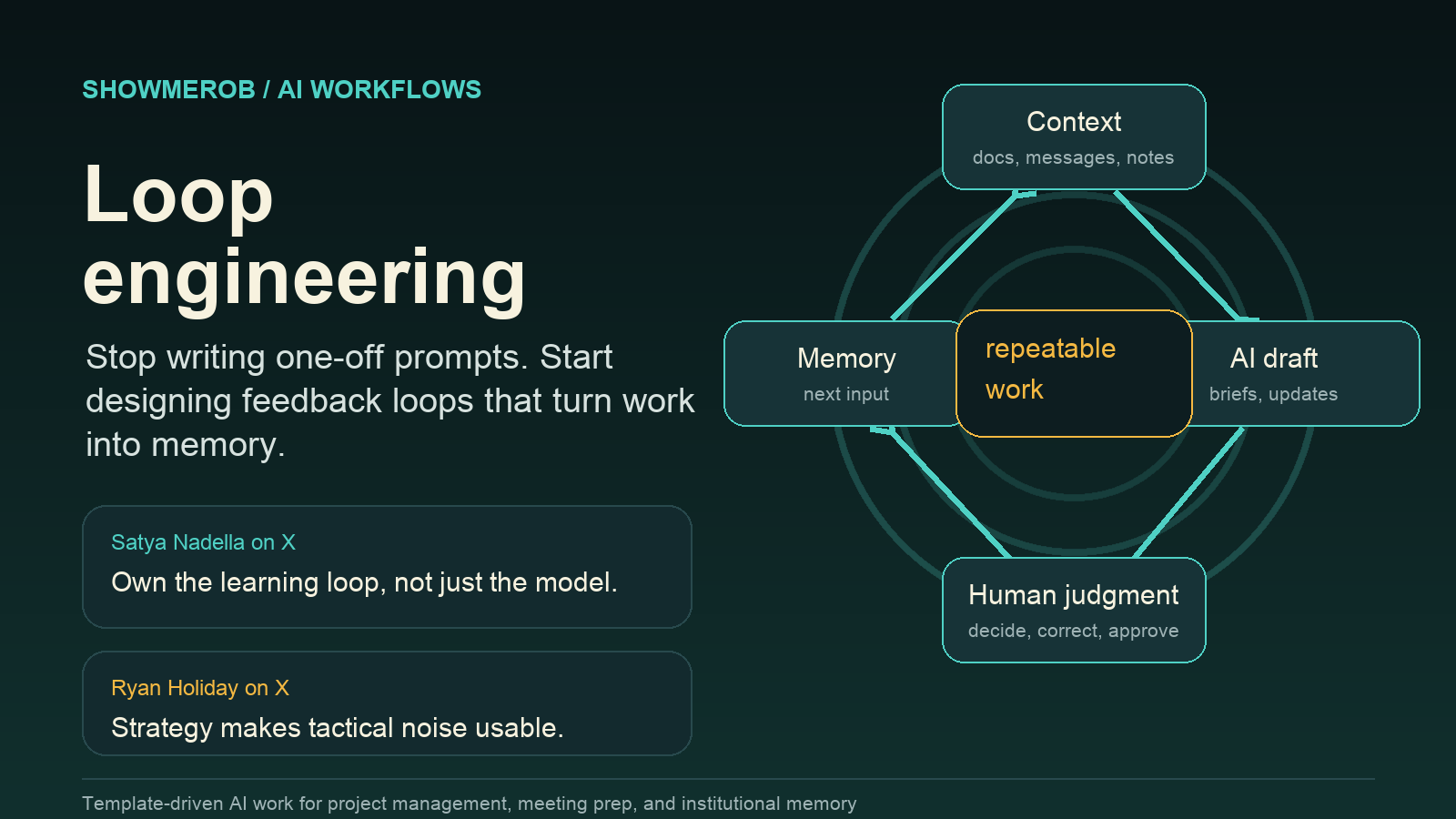
That is the frame I keep coming back to.
AI gets much more interesting when it stops being a clever response machine and starts becoming a learning loop.
What I mean by loop engineering
Loop engineering is the practice of designing repeatable AI workflows where context comes in, the model produces a useful draft or analysis, a human makes judgment calls, the output gets stored somewhere durable, and the next cycle starts smarter than the last one.
That sounds more complicated than it is.
The first time this really clicked for me was not in a theoretical AI strategy conversation. It was in a recurring project meeting.
I mapped the loop as a before, during, and after rhythm: gather the signal, build the agenda, run the meeting, update the project record, then let that updated record become the starting point for the next cycle.
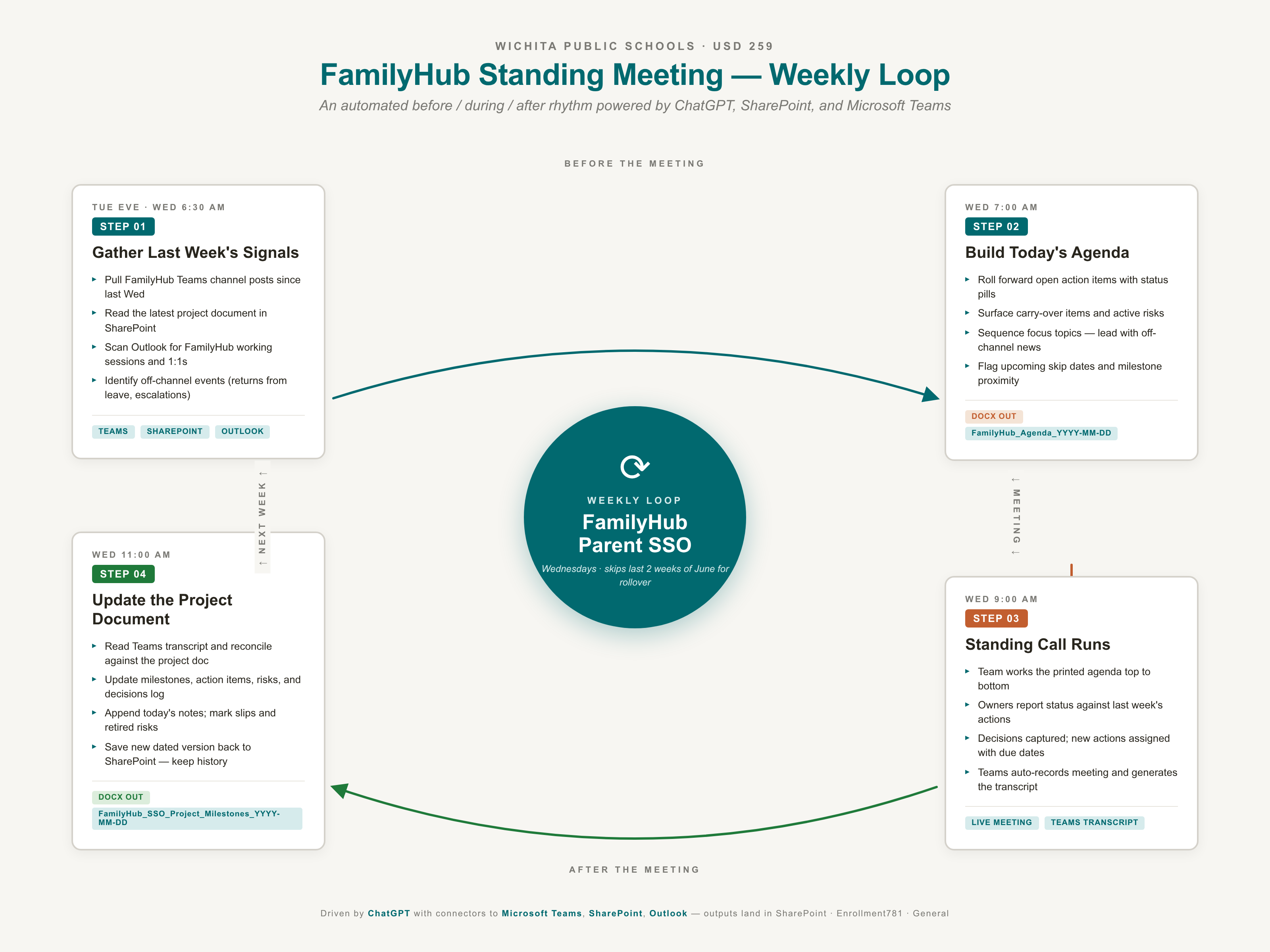
That picture matters because it shows the real shift. The AI is not floating above the work. It is sitting inside the rhythm of the work.
It can be as simple as a weekly meeting agenda prompt that always pulls from the same sources, checks the same open items, formats the same handout, and leaves behind a better record for next week.
It can be a project update prompt that reads the most recent project document, compares it with transcripts and messages, updates the action items, appends the decisions log, and preserves version history.
The point is not that AI writes the agenda.
The point is that the agenda is part of a loop.
Before the meeting, the system gathers the current state.
During the meeting, people make decisions.
After the meeting, the system updates the record.
Before the next meeting, the updated record becomes context.
That is a different mental model from "ask ChatGPT to make me an agenda."
One is a prompt.
The other is operating discipline.
The project management loop
Here is the basic loop I use for project management work:
- Pull the current state from the canonical project record.
- Pull new signal from meetings, messages, emails, notes, and documents.
- Compare new signal against the existing record.
- Update the record in place instead of duplicating information.
- Create a concise change summary for humans.
- Preserve the artifact so it becomes the starting point next time.
That fifth step matters.
If the only deliverable is a beautiful document, the loop is incomplete. The humans still need the delta. What changed? What moved? What got blocked? What requires a decision?
AI should reduce the cost of seeing the system clearly.
Not just produce better looking paperwork.
Download the templates
I also pulled the two reusable templates out into plain Markdown files so you can copy them into your own system instead of reverse-engineering the examples from the post.
- Download the weekly meeting prep loop template
- Download the weekly project document maintenance loop template
Use them as starting points, not sacred text. The bracketed sections are where the real loop engineering happens.
Template 1: weekly meeting prep loop
Use this when you have a recurring meeting and want AI to build the agenda from live project context instead of last week's vibes.
You are my meeting prep assistant for the weekly [project or program name] standing call.
>
Today is [day of week], and the meeting is [later this morning / this afternoon / tomorrow]. Build a polished agenda document I can use with the group.
>
CONTEXT
>
- Project: [brief project description]
- Cadence: [weekly / biweekly / monthly] [day/time] standing call
- Meeting owner: [role or team, not necessarily a person's name]
- Recurring attendees: [roles or stakeholder groups]
- Canonical project document: [location or system path]
- Collaboration channel: [Teams / Slack / email group / project board]
- Other reference documents: [links or locations]
>
WHAT TO DO
>
1. Pull every substantive message posted in [collaboration channel] since [last meeting date or prior standing call]. Ignore reactions, pleasantries, and duplicate chatter.
2. Open the most recent [canonical project document] and extract open action items, carry-over items, active risks, blockers, and upcoming milestones for the next [time window].
3. Check [calendar or meeting source] for related working sessions, stakeholder meetings, or 1:1s since the last standing call. Surface anything that should be reported back.
4. Note any calendar exceptions, blackout windows, launch dates, board dates, testing windows, or dependency deadlines that affect the next [time window].
>
BUILD THE AGENDA
>
Produce a [document / page / email / Markdown brief] with this structure:
>
- Cover block: "[Project name] meeting agenda, [meeting date]"
- Section 1: Meeting context, 2-3 sentences on what changed since the last meeting
- Section 2: Expected attendees, grouped by [team / function / role]
- Section 3: Agenda at a glance, with [time / topic / owner]
- Section 4: Review of last meeting's action items, with [owner / action / status]
- Section 5: Carry-over items
- Section 6: Active risks and blockers
- Section 7: Today's focus topics, with 3-5 talking points each
- Section 8: Milestone reference
- Section 9: Blank action item capture table, with [owner / action / due date]
- References section with links to [canonical document], [project channel], and [key supporting documents]
>
DESIGN OR FORMAT STANDARDS
>
- Use [font or house style]
- Use [brand colors or simple accessible formatting]
- Use consistent status labels: [DONE], [IN PROGRESS], [PENDING], [BLOCKED], [NEW]
- Keep the agenda readable in [meeting length] minutes
>
PRIORITIES FOR THIS MEETING
>
- Lead with [highest priority context]
- Give focused time to [critical deadline or decision]
- End with [calendar reminder, decision recap, or next-step confirmation]
>
DELIVERABLE
>
- Save the agenda as [file naming convention]
- Give me a one-paragraph summary of what changed since last time and the two highest priority discussion blocks.
The bracketed parts are the engineering surface.
That is where you decide what the loop sees, what it ignores, what it produces, and how humans will use the result.
Notice what the prompt does not say: "Make me a nice agenda."
It defines sources, filters, structure, design standards, priorities, and deliverables.
That is why the output can get better over time.
Template 2: weekly project document maintenance loop
This one is for after the meeting. It keeps the project record from turning into archaeology.
You are my project document maintainer for [project or program name]. I just finished the [meeting name or working session]. Update the canonical project document with this week's outcomes.
>
CONTEXT
>
- Canonical document: [system or folder] -> [path] -> most recent [file naming pattern]
- Meeting transcripts and notes can be found in:
1. [meeting recording transcript source]
2. [documents uploaded or pasted in this thread]
3. [project channel] posts since the prior version of the project document
4. [tagged emails or shared inbox] from the past [time window]
5. [OneNote / Google Doc / project notebook / shared notes] from this week
>
WHAT TO DO
>
1. Identify the most recent project document version and read it in full so you understand the current state of every section.
2. Pull today's meeting transcript and any working session transcripts since the last update.
3. From the transcripts and supporting sources, extract:
- Decisions made, including who decided, what changed, and why
- New action items, including owner, action, and due date
- Status changes on existing action items, including closed, slipped, reassigned, or blocked
- New risks or blockers
- Risks that have been retired
- Milestone shifts, including new dates, scope changes, or completion
- Scope changes or new deliverables
4. Cross-reference against the existing document. Do not duplicate items. Update existing entries in place.
>
UPDATE THE DOCUMENT
>
Maintain the same structure and visual design as the prior version:
>
- Cover
- Executive summary
- Milestone timeline
- Action items table
- Risk register
- Decisions log
- Meeting notes appendix
>
For each section:
>
- Executive summary: refresh the current-state paragraph to reflect what changed this week
- Milestones: update dates and statuses. If a milestone shifted, add a short note explaining why
- Action items: mark closed items as DONE, update IN PROGRESS items with latest status, add NEW items at the bottom of each owner's block, and mark slipped items with a slip count
- Risks and blockers: add new entries, mark retired entries as RESOLVED with date, and escalate aging blockers
- Decisions log: append today's decisions with date and decision maker role
- Meeting notes appendix: add today's notes as a new dated section while keeping prior weeks for traceability
>
NAMING AND VERSIONING
>
- Save as [project-name]_[document-type]_[YYYY-MM-DD].[file type]
- Upload or save to [same canonical location]
- Do not overwrite the prior version. Keep history.
>
DELIVERABLE
>
- The updated [document type]
- A one-page "what changed this week" summary listing:
- New decisions
- New action items with owners and due dates
- Status changes on existing items
- New risks
- Risks retired
- Milestone movement
- Flag anything ambiguous where you had to make a judgment call so I can verify before the document goes wide.
This is where loop engineering gets practical.
The meeting prep prompt creates the before-state.
The document maintenance prompt creates the after-state.
Together, they make the project easier to steer because the system is always asking: what changed, what matters, what needs a human decision, and what should become memory?
The hidden value is judgment placement
The mistake is thinking AI value comes from letting the model do more.
I think the value comes from placing human judgment in the right parts of the loop.
AI can gather, compare, format, draft, summarize, and remember.
Humans still decide what matters.
Humans still know when a transcript phrase was political, when a due date is fake optimism, when a vendor update is doing a lot of work without saying much, and when a quiet blocker is about to become the whole project.
Good loop engineering does not remove judgment.
It makes judgment easier to apply.
That is especially true in schools and public-sector work. The dangerous version of AI is not that it gets used. The dangerous version is that districts rent convenience while vendors capture the learning.
If every prompt, correction, workflow, and project trace disappears into someone else's black box, the district may get faster while becoming less capable.
That is not transformation.
That is dependency with better autocomplete.
Ask better ownership questions
Nadella's frame points to a question every organization should be asking:
What learning loop do we retain if we switch models or vendors?
For a district, a company, a nonprofit, or a small team, that question changes the procurement conversation.
It moves us away from:
- Which chatbot is best?
- Which model is smartest?
- Which vendor has the flashiest demo?
And toward:
- What knowledge are we preserving?
- What corrections improve the system next time?
- What evals measure outcomes that matter here?
- What workflows become more coherent each cycle?
- What can we change without losing our institutional memory?
That is the grand strategy version of AI adoption.
The tactical version chases tools.
The strategic version builds capacity.
A simple test for your next prompt
Before you write your next AI prompt, ask five questions:
- What context should this loop always read first?
- What should it ignore?
- What artifact should it produce?
- Where should human judgment enter?
- What should be saved so the next cycle starts smarter?
If you cannot answer those, you are probably writing a one-off prompt.
That might be enough for the task in front of you.
But if the work repeats, build the loop.
The future of AI at work is not just better models.
It is better loops.
And the organizations that learn how to engineer those loops will not just move faster.
They will remember better.
They will decide better.
They will stop starting over every Monday morning.