I am not using AI like a chatbot anymore
How I use Henry on OpenClaw and Frank on Hermes as a home-lab AI operating layer, with a Mac client, Tailscale, skills, memory, scheduled jobs, and integrations.
Most people are still using AI like a search box.
They open a tab. Ask a question. Copy the answer. Paste it somewhere else. Then the context disappears.
That is useful.
It is also the least interesting version of what this technology can become.
The real shift happens when AI stops being a place you visit and starts becoming a layer across your work.
Memory. Tools. Documents. Scheduled research. Messaging. Search across past conversations. A way to turn repeated workflows into skills.
That is what I have been building with Frank and Henry.
Henry runs on OpenClaw.
Frank runs on Hermes.
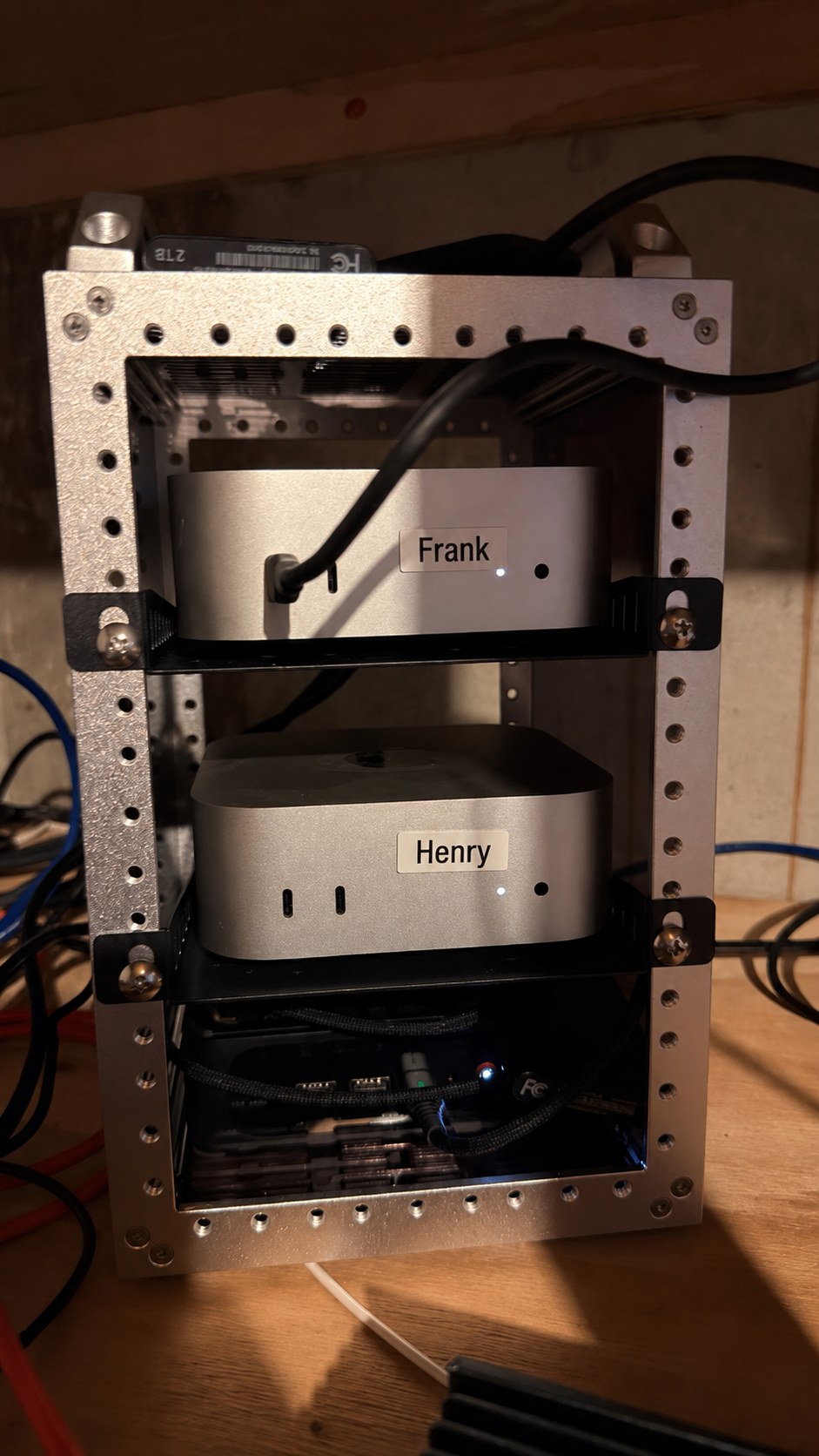
They sit on two small Mac systems in my home lab, labeled like tiny employees in a very strange school district org chart. Frank is on top. Henry is below. Both are connected into a growing personal knowledge system that includes Notion, GBrain, Google Workspace, scheduled jobs, local tools, and Telegram.
That home lab detail matters. This setup is mine. It is not running on the district network, and it is not a district-managed AI system. I am experimenting in my own environment so I can understand the workflow, the risks, and the design patterns before I talk about what any of this might mean for schools.
This is not a chatbot experiment anymore.
It is closer to a personal operating system.
And that distinction matters.
A chatbot answers the prompt in front of it.
An operating system helps preserve context, route work, schedule attention, and reduce the cost of starting over.
Most knowledge work does not fail because people are not smart enough.
It fails because context leaks.
The meeting happened, but the follow-up died.
The article was useful, but the idea never made it into the system.
The email mattered, but it got buried.
The draft started strong, but the research lived in five different places.
The same report gets rebuilt every month because no one can find the last version.
That is the problem I am trying to solve.
Not "How do I make AI write more words?"
I have plenty of words. So does everyone else. The internet is choking on them.
The better question is: how do I build a system that helps me notice what matters, remember what matters, and act on what matters?
That is where Frank and Henry come in.
Henry is my thought partner
Henry runs on OpenClaw.
I think of Henry as my thought partner.
He is where I test ideas, push on framing, work through research questions, and let messy thinking get a little more organized before it turns into something public.
Henry handles Telegram commands, Mac-local tools, durable memory, research workflows, scheduled briefings, skills, and GBrain-backed context.
But the role is not just execution.
Henry helps me think.
He can help with research synthesis, memory-backed recall, local command workflows, Notion context, mail and calendar context, scheduled research, and tool-based exploration.
Henry also has model routing. Different tasks can go to different models depending on what the work needs.
Some jobs need speed. Some need deep synthesis. Some need coding. Some need writing. Some need fallback options.
One model is rarely the best model for everything. Henry lets me think less about "which chatbot should I open?" and more about "what kind of work is this?"
That is a better frame.
Frank is my orchestrator
Frank runs on Hermes.
I think of Frank as my orchestrator.
Hermes is an open source AI agent framework from Nous Research. It runs from the command line, through messaging platforms, and as a persistent assistant with memory, tools, skills, scheduled tasks, profiles, browser automation, and local system access.
Frank is the more developed orchestration layer in my setup.
Frank helps with research, writing, daily briefings, search across prior sessions, GBrain ingestion, Notion publishing, Google Workspace, document workflows, Apple and Bee context, social style review, scheduled task monitoring, Hermes maintenance, and subagent delegation.
That sounds like a lot because it is.
But the point is not the tool count.
The point is continuity.
Frank has durable memory. He knows the themes that keep showing up in my work: AI in education, K-12 leadership, cybersecurity, privacy, edtech ROI, learner agency, school design, Creative Minds, future-ready learning, and the tension between tool adoption and actual transformation.
That matters because I do not want to re-explain my work every time I ask for help.
I do not want a generic AI voice.
I want an assistant that knows the shop.
Frank is not perfect. No agent is.
But Frank starts from context, and that changes the quality of the work.
The model is not the system
This is the part most people miss.
The model is not the system.
The workflow around the model is the system.
A model can write. Summarize. Classify. Reason. Search, if connected to tools. Maybe code. Maybe browse.
But if the output dies in the chat window, you do not have an operating layer.
You have a very articulate scratchpad.
The system starts to matter when the assistant can remember durable context, load reusable workflows, search the web, search prior conversations, read and write files, use Google Docs, Drive, Sheets, and Gmail, publish to Notion, store knowledge in GBrain, run scheduled research, use a messaging layer, and ask for approval before external actions.
That is what Frank and Henry are built around.
Here is the workflow I am using.
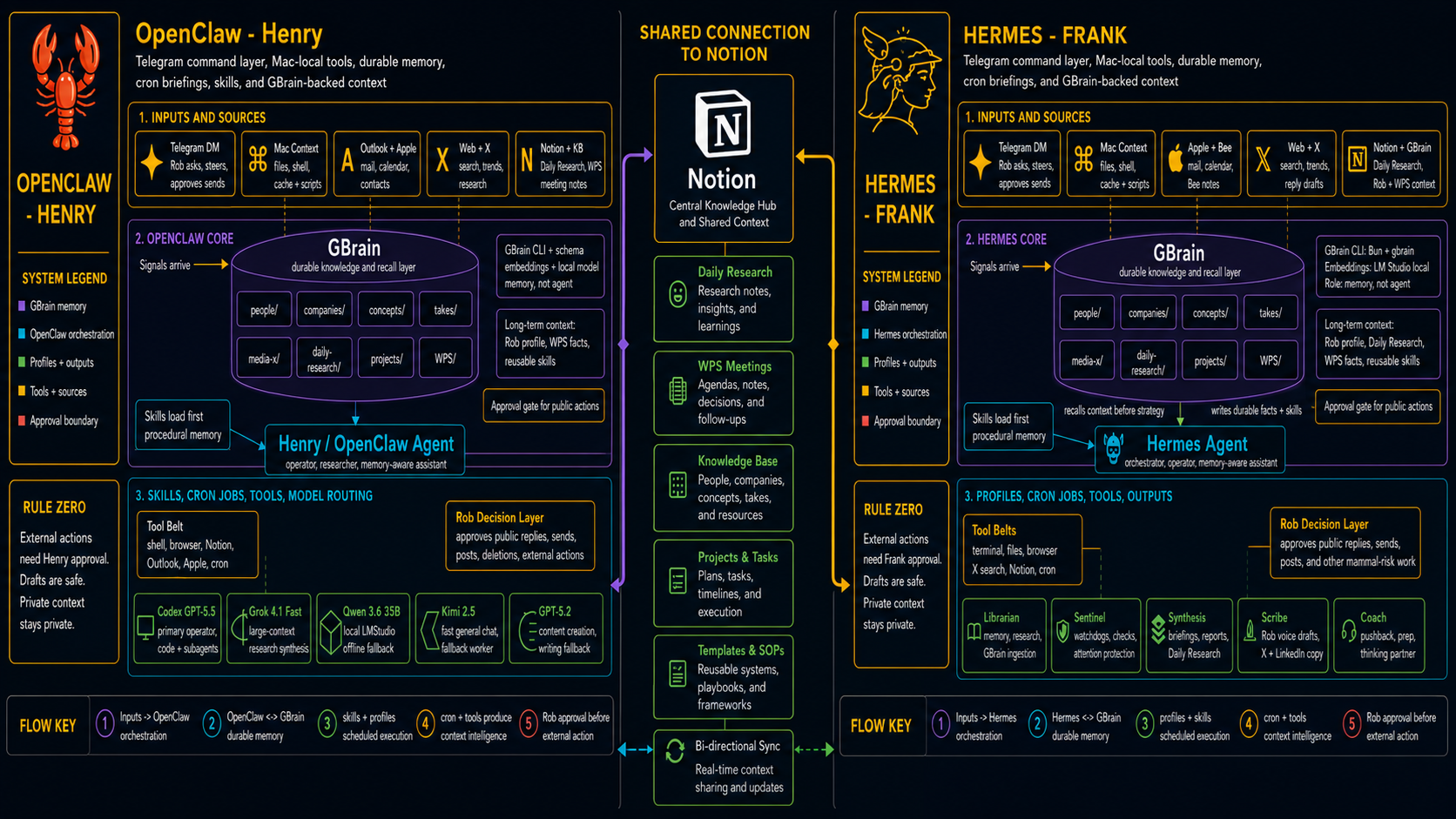
On the left is Henry.
On the right is Frank.
In the middle is Notion, which acts as a shared connection point and central knowledge hub.
Both agents connect into GBrain, my durable knowledge and recall layer. GBrain stores people, companies, concepts, takes, projects, WPS context, media items, and daily research.
That distinction matters.
The agent is not the memory.
The agent uses memory.
Too many AI systems blur that line. Then everything becomes a messy transcript swamp.
The architecture I am building separates the roles: Telegram is the command layer. Henry is the thought partner. Frank is the orchestrator. GBrain is durable memory and recall. Notion is the shared knowledge hub. Skills are procedural memory. Scheduled jobs produce recurring intelligence. Approval gates protect external actions.
That is the pattern.
Not one magic chatbot.
A system.
Inputs matter more than prompts
Prompting matters.
But inputs matter more.
If an assistant does not have the right context, even a brilliant prompt just produces a polished guess.
Frank and Henry are useful because they connect to the actual context of my work.
Henry's side includes Telegram direct messages, Mac files, shell access, cache and scripts, Outlook and Apple mail, calendar and contacts, web and X search, Notion and knowledge base context, daily research, and WPS meeting notes.
Frank's side includes Telegram direct messages, Mac files, shell access, cache and scripts, Apple and Bee mail, calendar and notes, web and X search, Notion and GBrain, Daily Research, Rob and WPS context, and Google Workspace.
That is where the quality changes.
A lot of AI work fails because the model is missing the operating picture.
It does not know what I have already been working on.
It does not know what I care about.
It does not know what meetings happened.
It does not know what research has already been collected.
It does not know the difference between a passing idea and a durable priority.
Frank and Henry are designed to reduce that context loss.
That is the real productivity gain.
Not magic.
Less re-explaining.
Scheduled research is where this gets real
The most practical part of the setup is scheduled research.
Frank currently runs recurring jobs. Some use the full agent. Some are no-agent scripts that simply collect data and deliver output.
That distinction is important.
Not everything needs an LLM.
Sometimes the right answer is a script.
Sometimes the right answer is an agent.
Sometimes the right answer is a script that gathers the raw material and an agent that reasons over it.
My scheduled jobs include daily K-12 AI and edtech briefings, weekly content idea generation, weekly conference and speaking prep, weekly significant technology developments, daily global tech post drafts, K-12 CIO social content packages, X monitoring for Dan Koe, AJ Juliani, and Sahil Bloom, trend mining, reply opportunities, customer pain discovery, social style review, Bee mirror candidate review, workflow and skill audits, Hermes maintenance, failure triage, email digests, and forwarding watchers.
This is where the setup stops being a chatbot experiment.
Frank does not wait for me to remember what future-me wanted.
He runs the job.
Research shows up. Trends show up. Possible writing ideas show up. Weak signals start to accumulate.
Over time, that becomes an ambient intelligence layer.
This matters because most knowledge work does not break from lack of intelligence.
It breaks from lack of continuity.
The idea was there, but it never got captured.
The article was useful, but it never got connected.
The meeting created next steps, but nobody carried them forward.
The insight showed up on Tuesday, but by Friday it was buried under 200 emails and a calendar full of small fires.
Scheduled research is one way to fight that.
It does not make decisions for me.
It helps keep the right ideas from disappearing.
I gave Frank a Google account
One major addition to Frank was Google Workspace.
I gave Frank a dedicated Google account.
I also gave Frank Google skills so he can work with Gmail, Calendar, Drive, Docs, Sheets, and Contacts through OAuth.
That means Frank can help with workflows like searching Gmail, reading forwarded action items, triaging messages I send to Frank, searching Google Drive, uploading and downloading files, creating or reading Google Docs, appending to Docs, creating and updating Sheets, reading spreadsheet ranges, working with calendar data, and looking up contacts.
The important detail is that Frank has his own assistant identity.
That is cleaner than pretending the assistant is me.
If I forward something to Frank's Gmail account, the workflow is obvious: Frank checks the assistant inbox, reads the forwarded item, summarizes it, and suggests next steps.
He does not reply as me unless I explicitly ask.
He does not send email without approval.
He does not share or delete Drive files without approval.
That boundary matters.
The goal is not to create an AI that impersonates me.
The goal is to create a responsible delegation point.
If an assistant has a mailbox, a Drive account, Docs, and Sheets, it can become a real workflow endpoint.
I can forward something to Frank and say: track this, summarize this, turn this into a draft, add this to research, make a Sheet from this, or save this to the knowledge base.
That is different from pasting random content into a chatbot.
It is a workflow.
How the Google setup works
The Google Workspace integration is installed as a Hermes skill inside the broader workspace integration skill.
The setup uses Google OAuth.
The one-time setup looks roughly like this: create or select a Google Cloud project, enable the Gmail API, Google Calendar API, Google Drive API, Google Sheets API, Google Docs API, and People API, create an OAuth 2.0 Desktop app credential, download the client secret JSON, run the Hermes setup script to authorize the account, and verify that the authenticated account is Frank's dedicated Google account.
That last step is boring and critical.
Before reading or acting inside Google Workspace, Frank verifies which Google account is authenticated. That prevents the classic automation mistake: right command, wrong account, bad day.
Boring is underrated.
Most good infrastructure is boring.
My Hermes setup
Frank runs on Hermes Agent. Hermes is the orchestration side of this experiment: the client, the backend, the gateway, the skills, the scheduled jobs, the memory, and the integrations.
The basic install is simple.
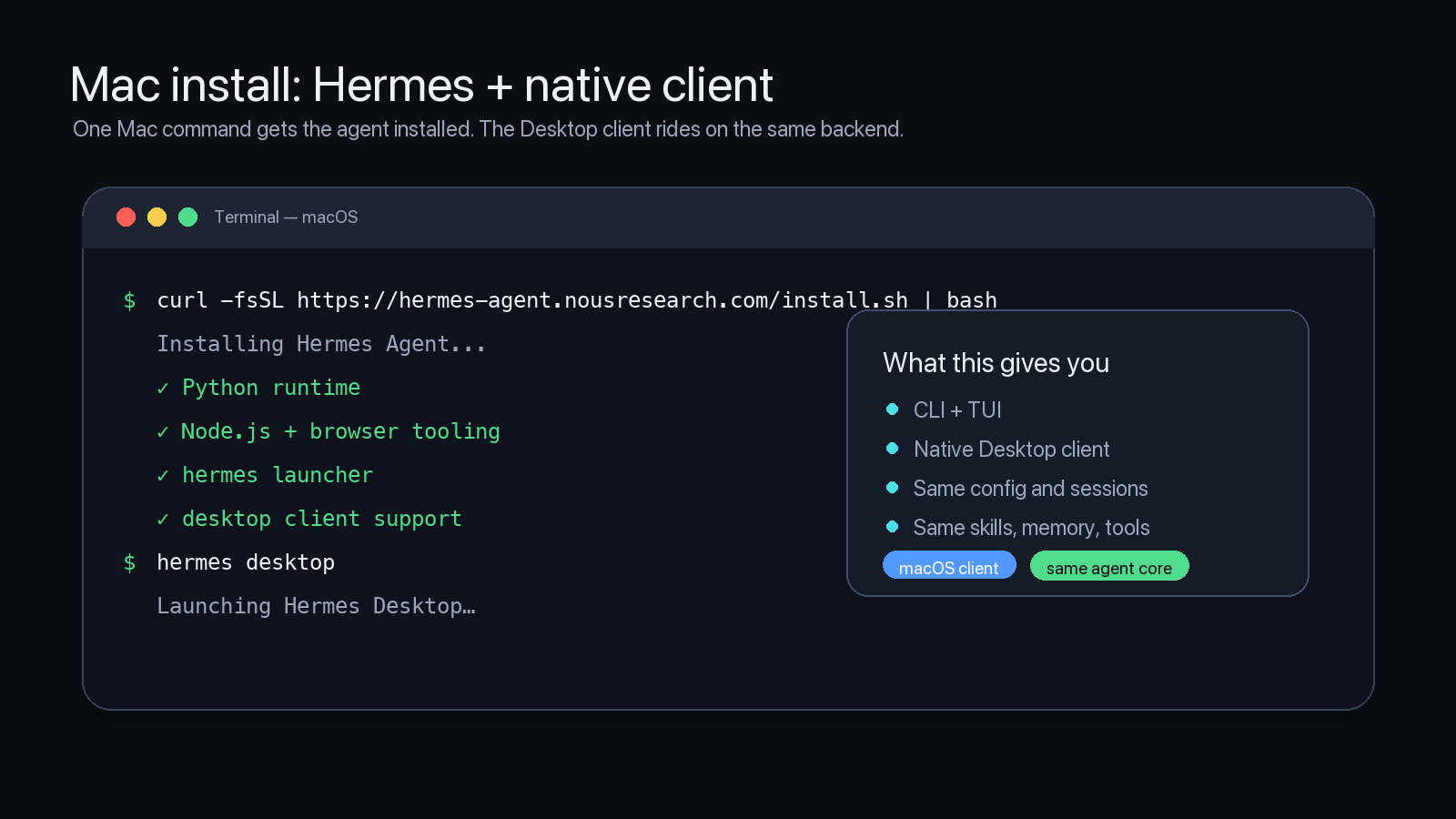
If you want the desktop app on macOS or Windows, the easiest path is the Hermes Desktop installer from https://hermes-agent.nousresearch.com/desktop.
For macOS, Linux, WSL2, or Termux, the command-line install is:
curl -fsSL https://hermes-agent.nousresearch.com/install.sh | bash
For native Windows PowerShell:
iex (irm https://hermes-agent.nousresearch.com/install.ps1)
After a command-line install, the desktop client launches with:
hermes desktop
The easiest setup path is still:
hermes setup --portal
That connects the model provider and the Nous Tool Gateway, which gives access to managed web search, browser automation, image generation, and text-to-speech. You can also configure pieces individually with hermes model, hermes tools, hermes gateway setup, hermes config edit, and the other setup commands.
Hermes v0.16.0 is where the client/server shape gets practical.
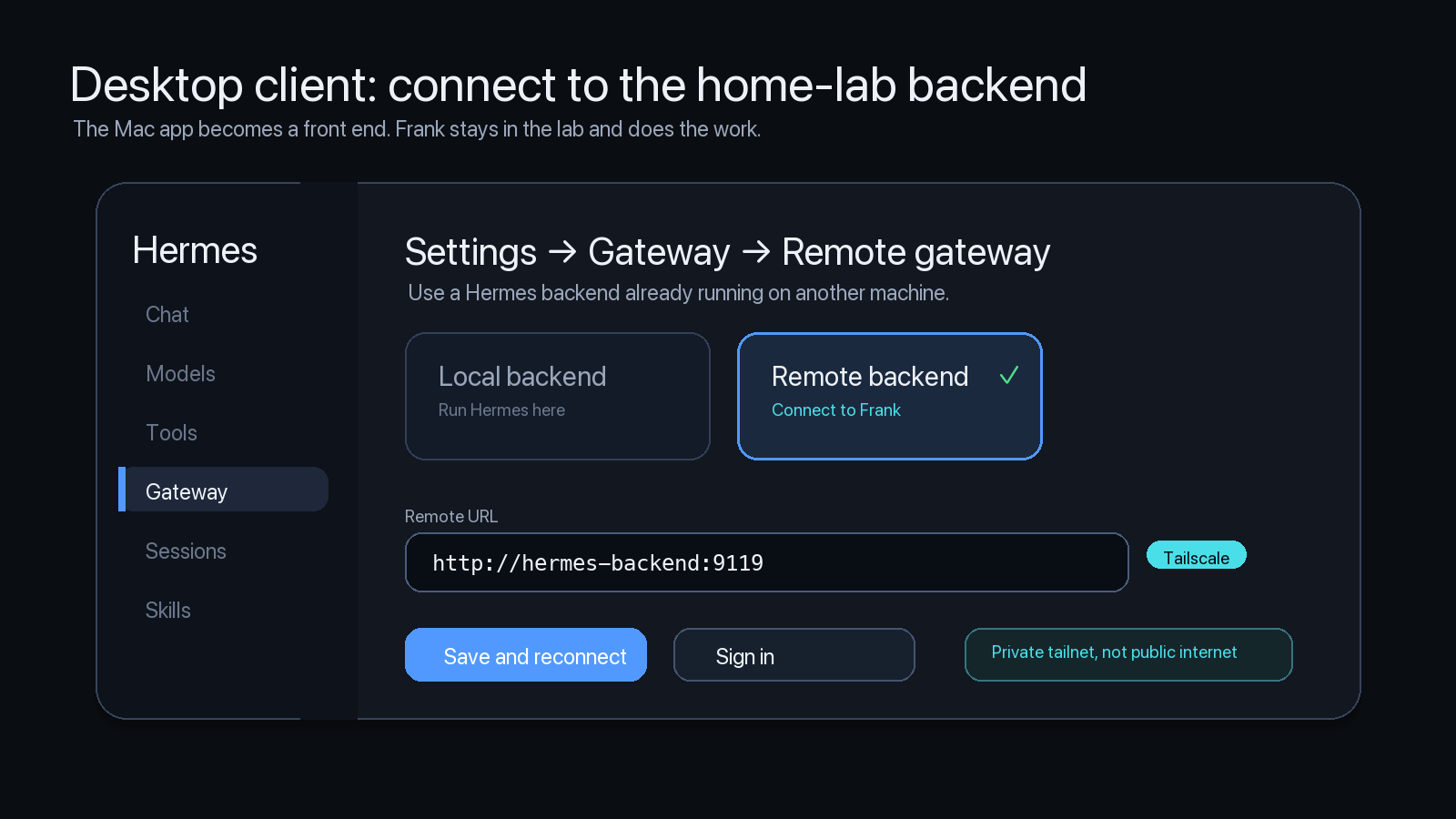
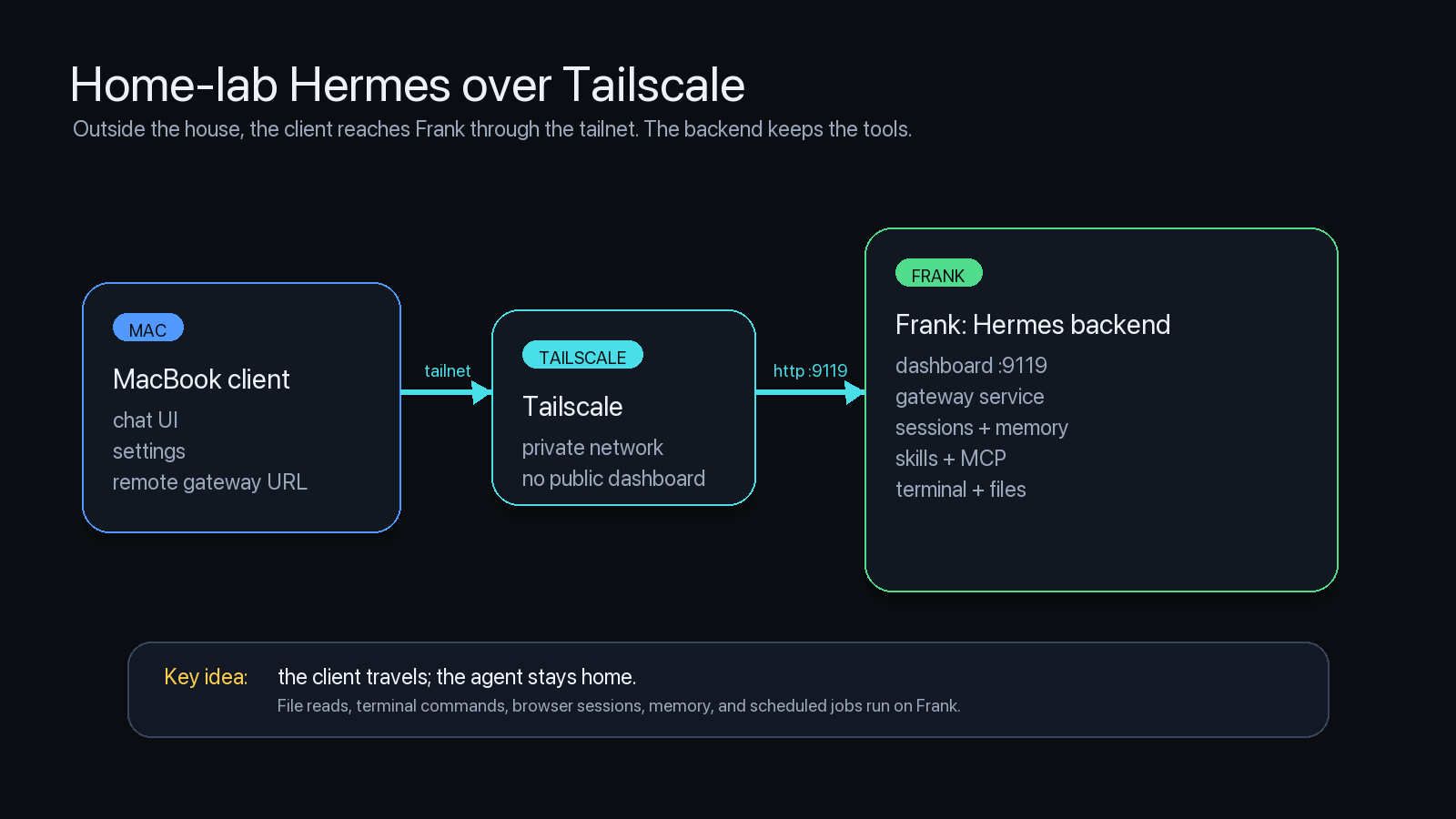
In my setup, Hermes runs on the backend Mac in the home lab. The desktop app can run somewhere else. When I am outside the house, the Mac client reaches Frank through Tailscale instead of exposing the Hermes dashboard directly to the public internet.
The backend is the machine that matters. It owns the filesystem access, terminal commands, browser sessions, scheduled jobs, memory, skills, logs, and messaging gateway.
The client is the interface.
That distinction matters. If I connect from a laptop at a conference, Hermes is not suddenly reading random files on that laptop. The work runs where Frank runs.
The remote setup looks like this:
- Install Hermes on the backend Mac
- Run
hermes dashboard --no-open --host 0.0.0.0 --port 9119on that backend - Keep
hermes gateway startrunning there if I want Telegram, Discord, Slack, or other channels online - Open Hermes Desktop on the client Mac
- Go to Settings, Gateway, Remote gateway
- Enter the backend URL
- Connect through Tailscale when I am outside the home lab
I do not want the Hermes dashboard sitting naked on the public internet like a raccoon with root access. Tailscale gives me a private path back into the home lab without turning the setup into a public target.
Hermes stores its settings in ~/.hermes/. That directory includes config.yaml for model, terminal, memory, display, delegation, approval, and tool settings; .env for secrets; auth.json for OAuth; skills/ for reusable procedures; memories/ for durable context; cron/ for scheduled jobs; sessions/ for session history; and logs/ for agent and gateway logs.
The rule is simple: secrets go in .env; behavior goes in config.yaml.
Skills are where Frank gets useful
Hermes skills are reusable workflows stored locally.
A skill can include when to use it, what steps to follow, which tools to call, known pitfalls, verification steps, and supporting scripts or reference files.
Frank currently has 71 enabled skills.
Some are built into Hermes. Some came from skill hubs. Many are local skills created for my actual workflows.
The categories include research, note-taking, Google Workspace, Notion, GBrain ingestion, social media style review, content creation, Apple and macOS tools, GitHub workflows, software development, scheduled task triage, workflow audits, podcast production, document workflows, maps and local context, and Hermes maintenance.
This is where Frank becomes personal.
A generic chatbot needs me to explain the workflow every time.
Frank can load the relevant skill.
For example, when I ask for public writing, Frank can load my style review skill. That skill tracks my current public voice: punchy, practical, systems-aware, focused on AI in education, leadership, learner agency, human judgment, and the gap between tool adoption and actual transformation.
It also reminds Frank what not to do.
No generic AI optimism.
No jargon piles.
No "future-ready" booth language.
No superintendent-newsletter polish unless the details actually earn civic warmth.
That is not just style.
That is quality control.
Hermes has a built-in skills system. You can list skills with hermes skills list, search available skills with hermes skills search QUERY, install a skill with hermes skills install SKILL_ID, inspect one before installing with hermes skills inspect SKILL_ID, and configure availability with hermes skills config.
Skills live in ~/.hermes/skills/.
Some skills come bundled with Hermes. Others can be installed from hubs or direct URLs. Local skills can be written or edited by the agent as workflows become repeatable.
That last piece is important.
When Frank solves a non-trivial workflow, I can turn it into a skill.
The next time I ask for that kind of work, he does not have to rediscover the process.
That is procedural memory.
And procedural memory is what most AI tools are missing.
They remember the current chat, maybe.
They do not remember how the work should be done.
Why this matters for schools
This is where the setup connects back to education.
Most AI conversations in schools still sound like tool conversations.
Which chatbot should we use?
What should the policy say?
How do we stop cheating?
What prompt should teachers try?
Those are real questions.
They are not enough.
Agents push on the structure of work itself.
If an AI assistant can remember, search, schedule, draft, verify, use tools, work through documents, and coordinate with other agents, then the question changes.
It is no longer just: how do we let people use AI?
It becomes: where does context get lost? Which workflows depend on one person remembering everything? Which meetings exist because no one has a shared operating picture? Which reports are rebuilt from scratch every month? Which decisions stall because the information is scattered? Which student experiences are still designed around compliance instead of agency?
That is why I keep coming back to intentional design.
AI should not be bolted onto broken workflows and called transformation.
That is just digitizing compliance with better autocomplete.
The real opportunity is redesigning the work.
Not replacing human judgment.
Not outsourcing relationships.
Not automating responsibility.
Redesigning the system so people spend less time reconstructing context and more time making better decisions.
Rule zero
Both agents have the same rule zero: external actions need approval.
Drafts are safe.
Private context stays private.
This is not a small footnote.
If an assistant can search, draft, send, schedule, post, publish, modify files, and interact with external systems, then boundaries are not optional.
They are the design.
I do not want an agent replying to emails without permission.
I do not want it publishing public posts without review.
I do not want it deleting files because it inferred too much from a vague instruction.
I do not want private context leaking into public channels.
So the pattern is simple.
Frank and Henry can search, summarize, draft, prepare, organize, and recommend.
External actions require approval.
That is not distrust.
That is trust with architecture.
What Frank and Henry are teaching me
Frank and Henry are teaching me that the future of AI is not one assistant.
It is an ecosystem.
There is the command layer.
There is the memory layer.
There is the tool layer.
There is the scheduling layer.
There is the knowledge base.
There are approval boundaries.
There are specialized roles.
There are workflows that become skills.
That is a very different way to think about AI adoption.
The chatbot was the doorway.
The operating layer is the room.
And once you start building that room, the question is no longer: what can this model answer?
The better question is: what part of my work should this system help carry?
For me, the answer is becoming clearer.
Henry helps me think through ideas, pressure-test framing, synthesize research, and explore what might matter.
Frank helps orchestrate the system: preserving context, drafting ideas, monitoring signals, managing scheduled research, searching across memory, and working through documents.
Together, they are not replacing my thinking.
They are helping me stop losing the thread.
That is a much better goal.
Because the point of AI in education, leadership, or knowledge work should not be to make everything more automated.
The point should be to make the work more intentional.