Hermes, hands on
Before you come, install Hermes at home. A 30-minute walk from a beginner Hermes install on your laptop to the system I run. Free, at Groover Labs, with dinner from the Newman University DBA program.
- When
- Wednesday, October 21, 2026
- Time
- 5:00-7:00 PM CT
- Where
- Groover Labs, 334 N. St. Francis Ave, Wichita
- Cost
- Free
- Bring
- Laptop, charger, and phone. Install Hermes at home. No coding.
- Dinner
- Newman University DBA program
With The Newman Institute for AI and the Common Good, the WSU AI Club, and the Newman University Coding Club.
-
0-5
01 One assistant on your laptop
Add. Hermes Desktop on the Mac or Windows laptop you brought. One model. One chat. No coding. You are done when a message gets a reply.
Why. Tonight starts on the laptop in front of you.
-
5-10
02 Interview the soul
Add. Six questions. The agent writes SOUL.md from your answers. You read the file before you keep it. You are done when the file is on screen and you changed one line.
Why. A helpful assistant agrees with you. A soul file gives it a job, a voice, and a stop.
-
10-15
03 One procedure
Add. One skill for a job you already repeat. A morning note, a reading list, or a meeting recap. You are done when that skill runs.
Why. If you have explained it twice, it belongs in a procedure.
-
15-20
04 One quiet schedule
Add. One scheduled job that writes locally and stays silent when nothing changed. You are done when the job is saved and set to stay quiet.
Why. I had 66 scheduled jobs on October 12. 56 were active. Almost all of them are supposed to be quiet.
-
20-24
05 A phone, still no send
Add. Telegram, so a result can reach you. Lock it to your user. The token stays off this page. Do this only after the first four. You are done when the bot answers you, and only you.
Why. Nothing posts, and nothing sends, until you say so.
-
24-25
06 Split the models
Add. Specialist profiles beside the default assistant. Frank stays on grok-4.7. The other six keep their own models.
Why. Watch. Do not build this tonight. Writing, review, and research want different models.
-
25-27
07 Extend it
Add. A skill from the Skills Hub, one MCP connector, and a look at plugins. They install off until you turn them on.
Why. Watch. Do not build this tonight. The assistant stays small until a job needs a new tool.
-
27-30
08 The other machine, then the company
Add. Elon, the teammate bots, a private network, and a handoff. Then Paperclip, if the half hour is still open.
Why. Watch. This is the map, not the homework. The diagram at the end of the page is the map, not the homework.
This is a personal lab. It is not a school system. Credentials, machine names, private addresses, and work-only jobs stay off this page.
Before you come
Hermes workshop, Wed Oct 21, 5-7 PM, Groover Labs, Wichita. Source: host Kelly Israel Lotsu-Morgan's setup sheet.
1) Have ready
- A laptop with 5 GB free (Mac, Windows, or Linux). No Chromebooks; if that's all you have, reply to be paired with someone.
- A ChatGPT account (free is fine): chatgpt.com
- Telegram on your phone. Sign up early; the verification text can be slow.
- Do this at home. Groover's Wi-Fi can't handle everyone downloading at once.
2) Install Hermes Agent
Easiest: the app at hermes-agent.nousresearch.com/desktop (Windows 11 and Apple-chip Macs).
- Check About This Mac: if it says "Chip", the app works. If it says "Processor", use the terminal. Windows 10 also uses the terminal.
- Mac: drag to Applications. Windows: open the .appinstaller.
- Open Hermes. It installs the rest and opens a short setup chat (answer it or choose Skip setup).
Terminal:
- Mac/Linux:
curl -fsSL https://hermes-agent.nousresearch.com/install.sh | bash - Windows PowerShell:
iex (irm https://hermes-agent.nousresearch.com/install.ps1), then open a new window.
3) Sign in with ChatGPT
- App: gear > Providers > Accounts > Connect another provider > ChatGPT or Codex Subscription, then sign in. Keep the model gpt-6-luna and change Med to Max.
- Terminal: run
hermes model, choose ChatGPT or Codex Subscription, open the link, enter the code, pick gpt-6-luna with effort max, then runhermes. - Send "what can you do?". When it answers, you're done.
4) On the night
- Rob shows how he uses his agent, then walks everyone through connecting to Telegram.
- Bring your laptop, charger, and phone.
- Dinner by the Newman University DBA program.
- Note: Hermes can read files and run commands; we'll cover how to limit that.
- Stuck? Come at 5.
The clock below is the 30-minute walk. Do the first four stages on the laptop you brought. Minutes 20 to 30 are the map. Watch them. Do not build them tonight. If you only finish the first chat, you still did the workshop.
If a step has no picture, follow the words. Ask the person next to you before you open the tips sheet.
The Mac and Windows notes are the install. The notes under each later stage are how you do that stage. Telegram and everything after minute 20 stay on the page so you can see them. They are not the assignment. Official screenshots are from the Nous Research Hermes Agent repo, MIT License. Marketing art stays on their site. Where the docs have no screenshot, the step says screenshot coming.
Mac
Apple Silicon only. Intel Macs are not supported. The desktop app bundles Python. Source: Installation.
Download Hermes Desktop from the Hermes site. Their Mac icon and hero art stay there: apple.svg and hero.webp.
Open the DMG and drag Hermes into Applications.
First launch and onboarding. Picking Basic starts the app in Simple mode. screenshot coming. Source: Desktop.
Connect a model. In Desktop, open Settings, then Providers or Model. In the terminal, run hermes model, or hermes setup --portal for Nous Portal. xAI Grok OAuth works with a SuperGrok or Premium+ subscription and needs no API key. The terminal picker has no official screenshot. screenshot coming for that step. The dashboard picker is below. Source: Quickstart.
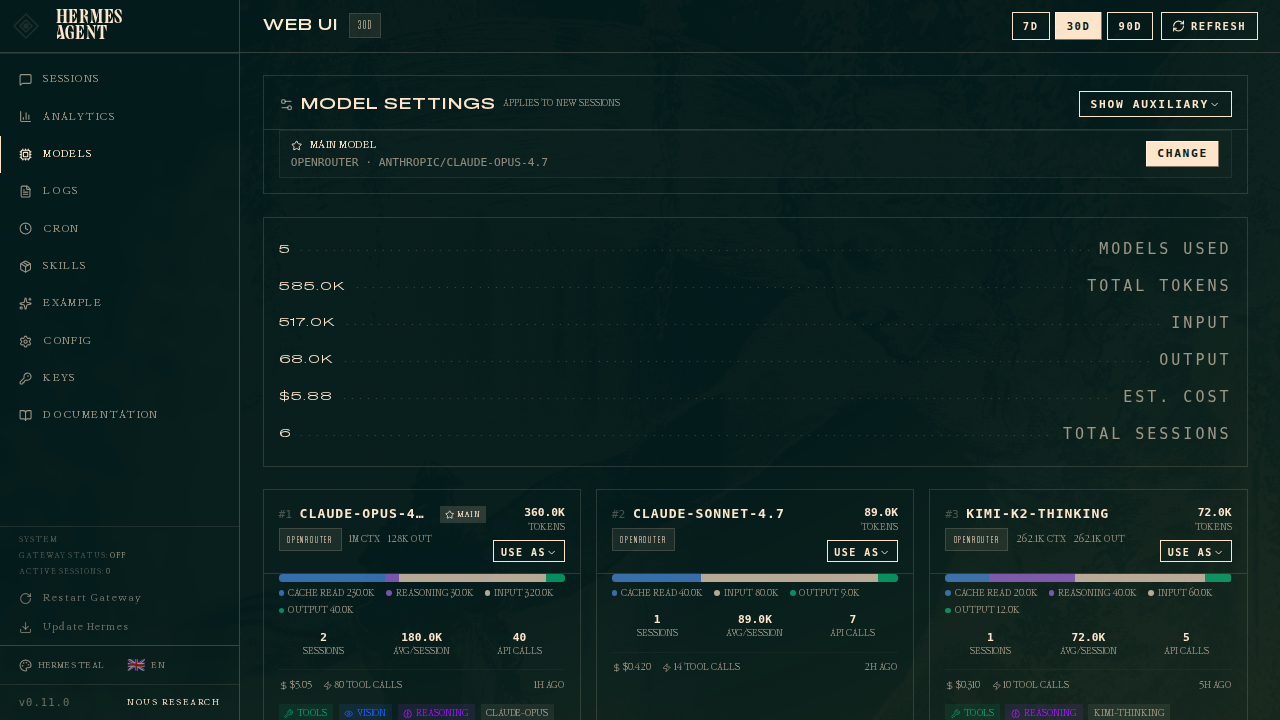
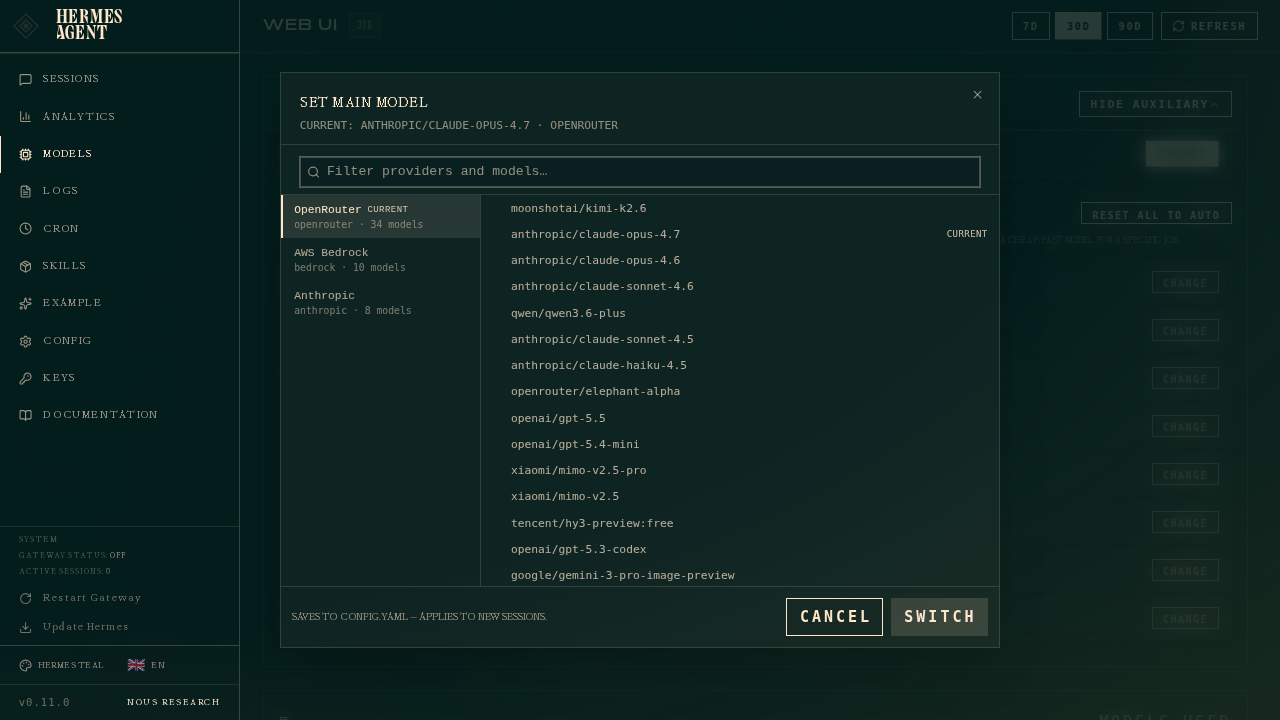
Only if the app install fails. In Terminal, run curl -fsSL https://hermes-agent.nousresearch.com/install.sh | bash, then source ~/.zshrc and hermes. You can add the desktop app later with hermes desktop. There is no screenshot of that install run. screenshot coming.
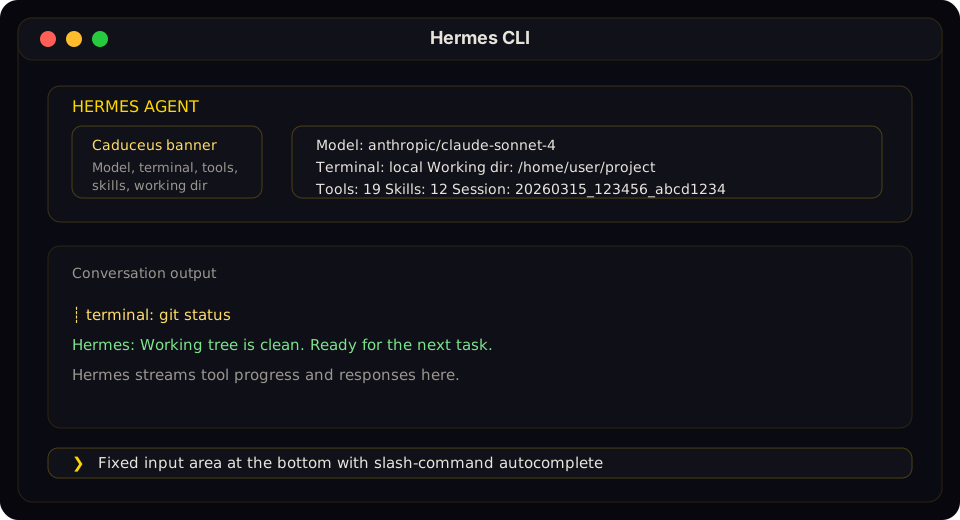
First chat. Type a message and confirm you get a reply. If it breaks, run hermes doctor.
Windows
Native Windows works without WSL. WSL2 also works with the Linux and macOS command. A native install lives under %LOCALAPPDATA%\hermes. Source: README and Installation.
Download Hermes Desktop from the Hermes site. Their Windows icon stays there: windows.svg.
Open the .appinstaller file with Windows App Installer. It installs the signed MSIX bundle and keeps it updated. screenshot coming.
First launch and onboarding match the Mac step. screenshot coming.
Connect a model the same way as on a Mac. The dashboard images above are the official ones.
Only if the app install fails. In PowerShell, run iex (irm https://hermes-agent.nousresearch.com/install.ps1). The installer brings its own pinned Python, Node.js, ripgrep, and FFmpeg, and installs Git if it is missing. screenshot coming.
Only if Windows blocks the install. Antivirus note. If Defender quarantines %LOCALAPPDATA%\hermes\bin\uv.exe, the README calls that a false positive. It is Astral's uv. The exclusion command is Add-MpPreference -ExclusionPath "$env:LOCALAPPDATA\hermes\bin", and it must run in an Admin PowerShell. Use it only after you verify the file the way the README describes.
First chat matches the Mac step. If it breaks, run hermes doctor.
Telegram
Do this only if the first four stages are done. You are done when the bot answers you, and only you. The token stays off this page. If you are out of time, skip this and watch the map.
Source: Telegram setup.
Quick path. In the dashboard or Desktop, go to Messaging, then Telegram, and click Create with QR. Scan the code in Telegram. Hermes creates the bot, detects your user ID, writes the token and the allowed-users list, and restarts the gateway. The token stays off this page.
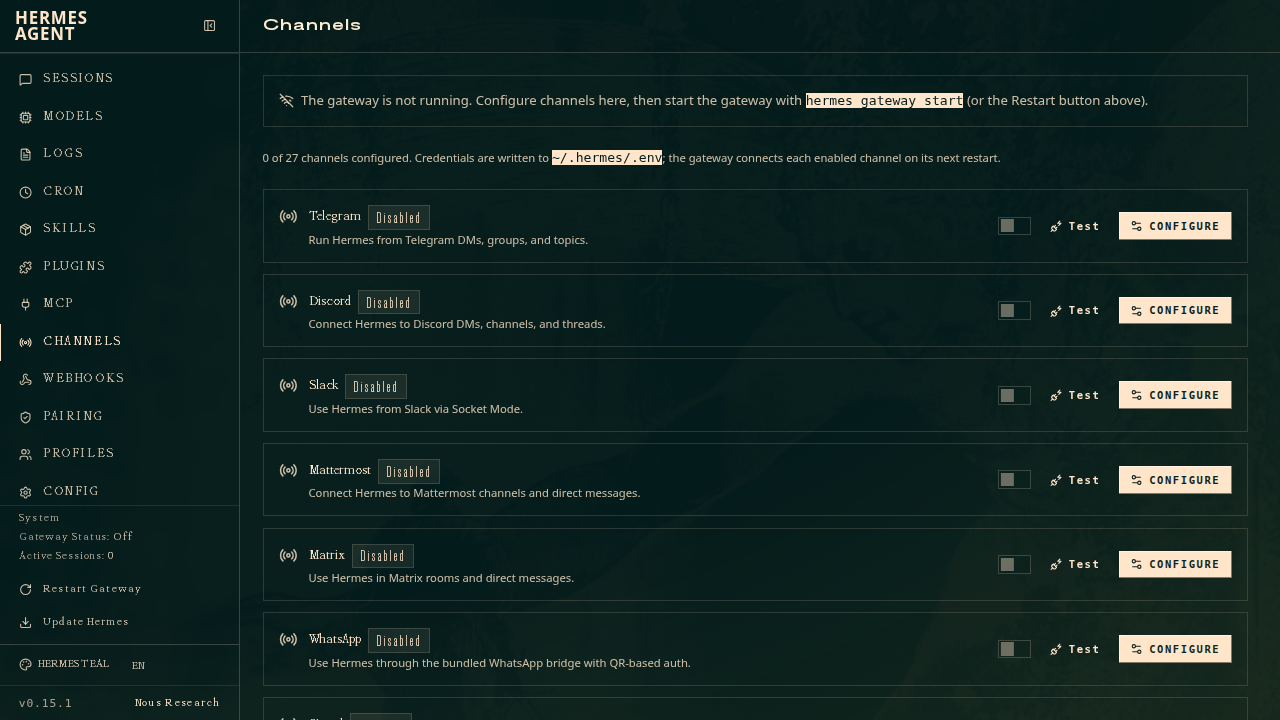
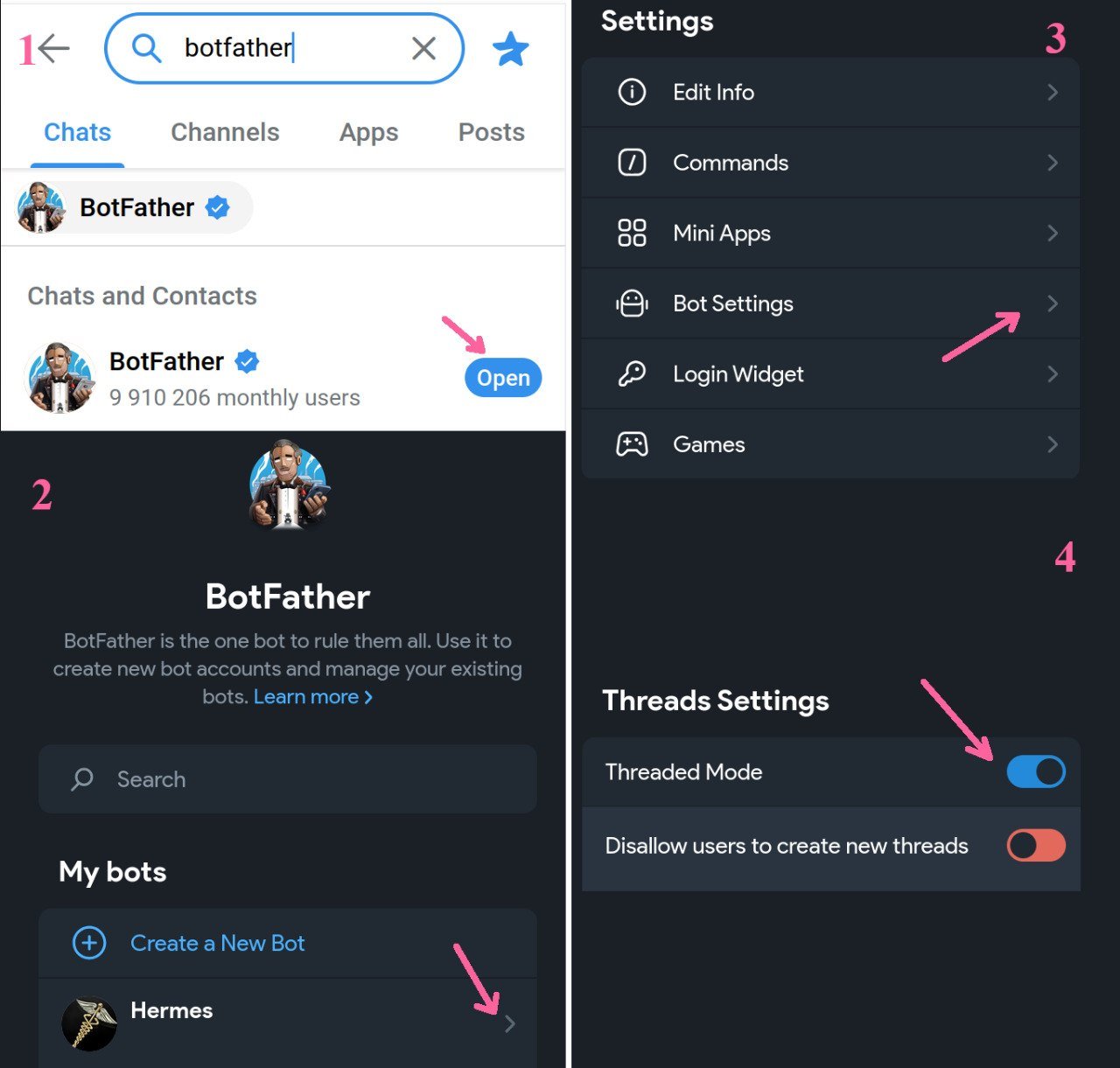
Manual path. In @BotFather, send /newbot and copy the token. Keep that token secret. Then run hermes gateway setup, choose Telegram, and enter the token and your user ID. Start it with hermes gateway.
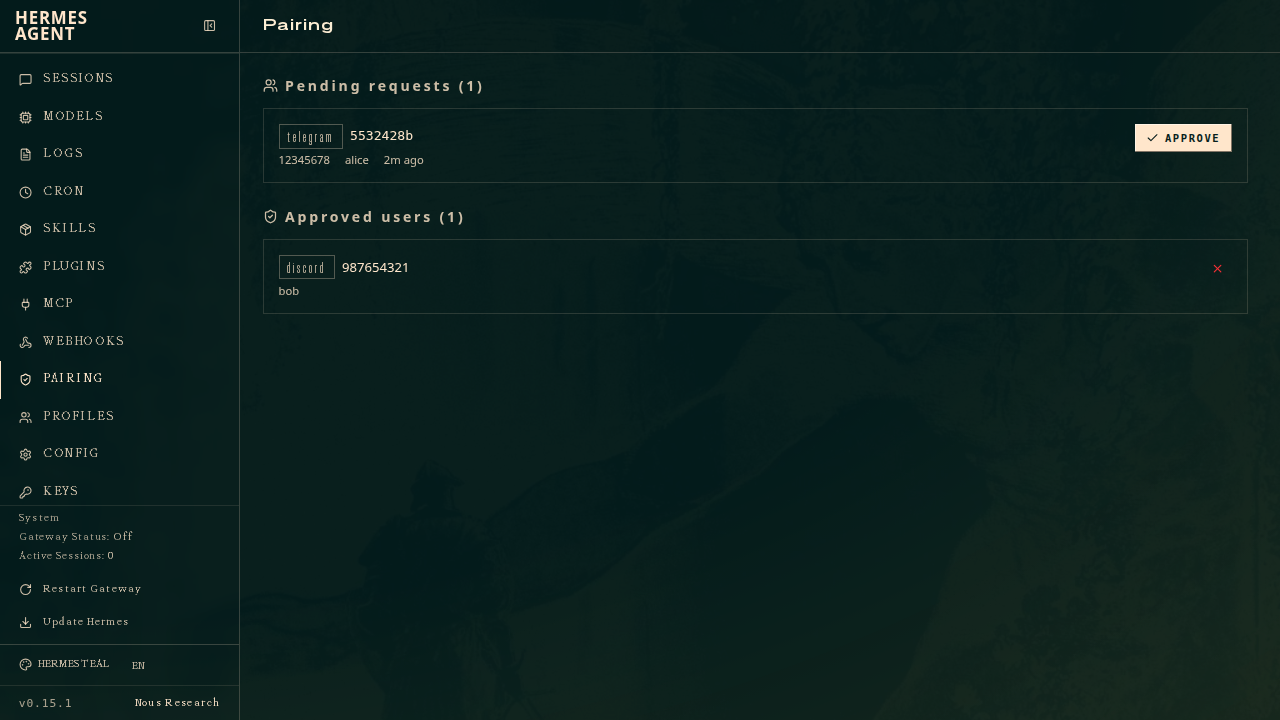
Lock it down. Use the allowed-users list and DM pairing approval. Source: Security. A chat with the bot has no official screenshot. screenshot coming.
Interview the soul
Minutes 5 to 10. You are done when SOUL.md is on screen and you changed one line so it sounds like you.
Paste this, then answer one question at a time:
Interview me one question at a time. Wait for my answer. Then write SOUL.md from my answers and show me the file. Do not invent projects I did not name.
A short answer is enough. Job can be "a research partner for the class I teach."
SOUL.md is who the agent is. It is not your class notes, and it is not a project file.
Minutes 5 to 10. Your first chat works. Next, give the agent a soul that fits you.
Do not paste someone else's soul file. Ask the agent to interview you, one question at a time, and to write SOUL.md from your answers. Answer these six, in order:
- Job. What job do you want this agent to do? Skip "helpful assistant." Name the work.
- Voice. How should it sound when it is just the two of you? How should it sound in anything that leaves the laptop?
- Pushback. When should it disagree? Only with a reason and a better next step. Not for sport.
- Stop line. Drafts stay drafts until you approve them. Posting, publishing, sending, and buying need a yes. Local research can move.
- Map. What are you building this month? What is stale enough to ignore?
- The loop. If you keep asking for work you do not use, what should it say?
Then tell it: write SOUL.md from these answers, show the file, and do not invent projects you did not name. Read the file before you keep it. Change any line that does not sound like you.
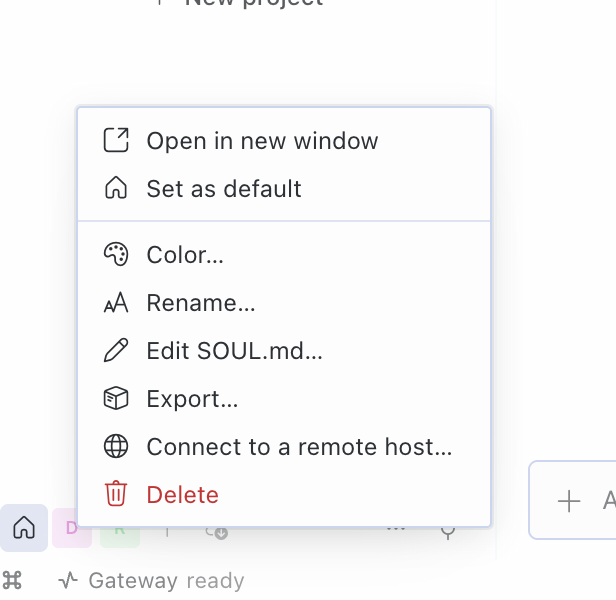
On Desktop, the profile square also has Edit SOUL.md. screenshot coming.
These questions are adapted from Tony Simons. His file is his. Yours should be yours.
One procedure, then one quiet schedule
Minutes 10 to 15. You are done when one skill runs. A skill is a procedure you can run again, not a new app.
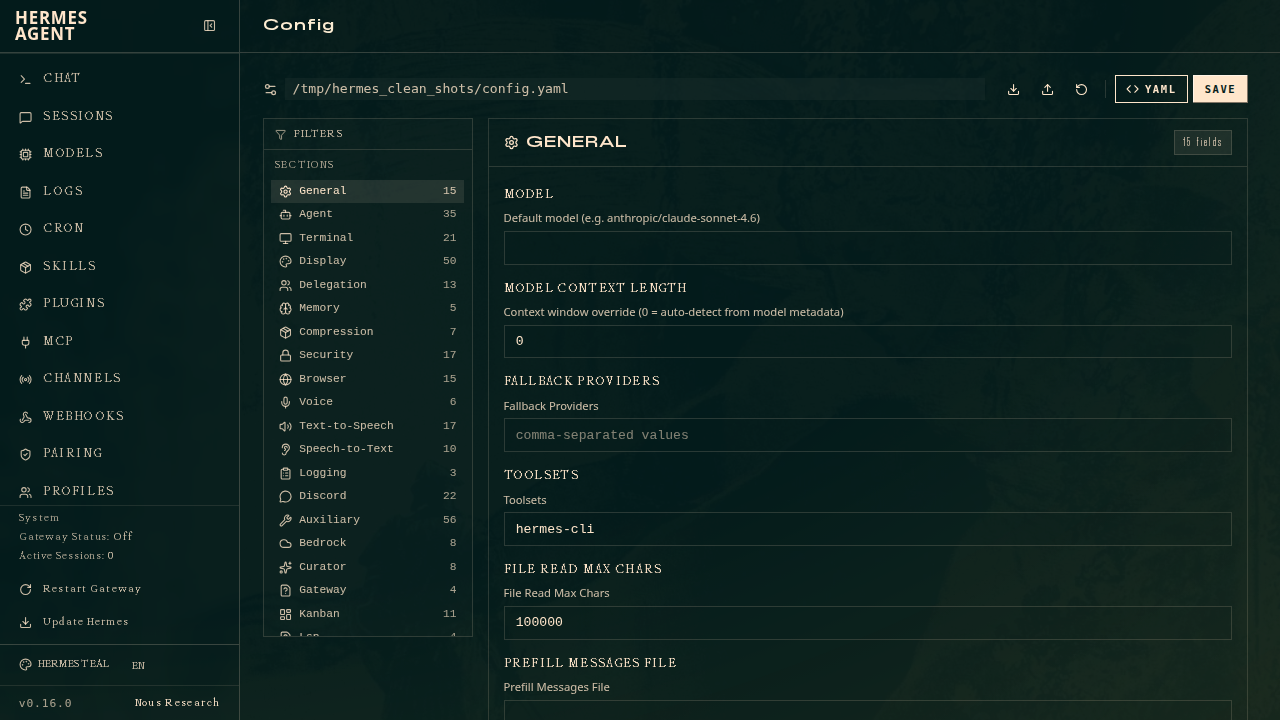
Minutes 10 to 15. Turn one job you already repeat into a skill. Use /learn from a document or from the current conversation, or install one from the Skills Hub.
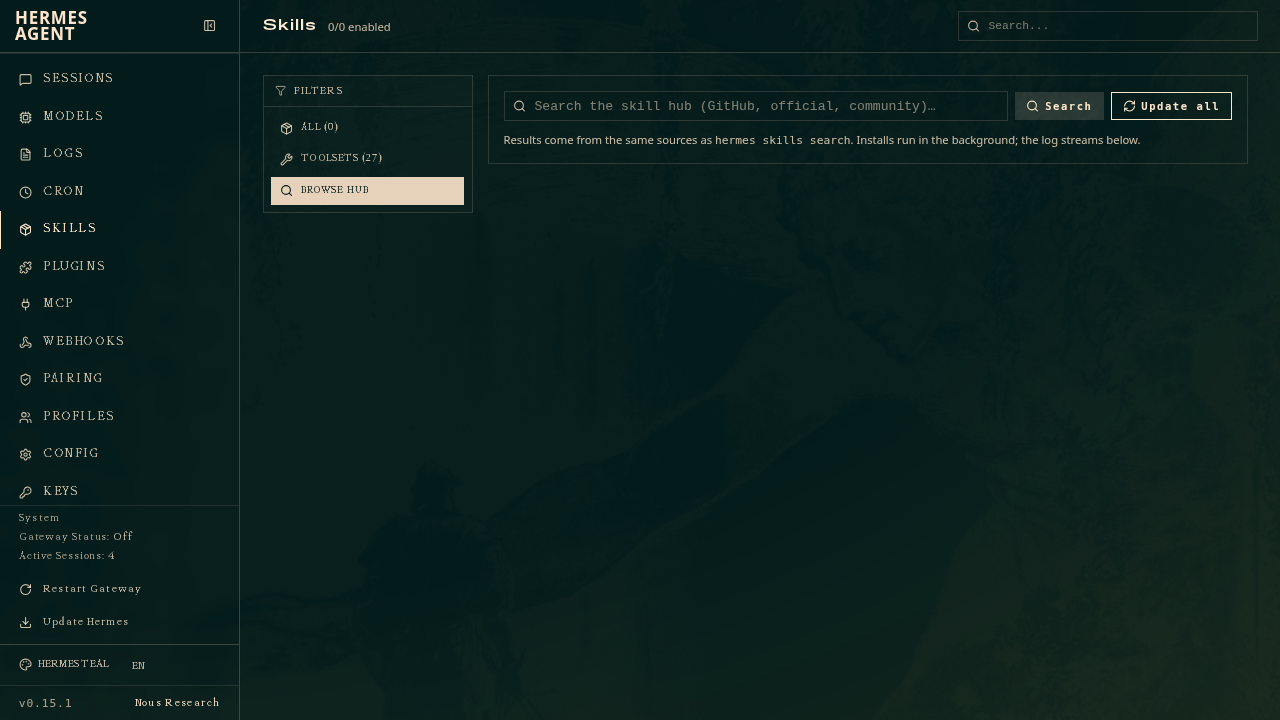
Minutes 15 to 20. You are done when one job is saved and set to stay quiet when nothing changed. A scheduled job is that procedure on a clock.
Minutes 15 to 20. Add one scheduled job that writes locally and stays quiet when nothing changed. Source: Cron. Their automation art stays on the marketing site: feature-automation.webp.
25 to 27: extend it
Watch. Do not build this tonight. MCP means a connector to another app. A plugin is code you leave off until you need it. A profile is a second agent with its own model.
This is the stop between split models and the end state. Skills, MCP, and plugins. Counts are from the official repo's main branch on October 12, 2026. They will move.
Skills are reusable procedures. The repo shipped 58 bundled skills and 155 official optional skills that day. They follow the agentskills.io standard. Install from the Skills Hub, or run hermes skills install. Use one with /<skill-name>. Teach one with /learn. Source: Skills.
MCP servers give Hermes outside tools. The curated catalog had 65 entries in optional-mcps/, all off by default. Run hermes mcp, hermes mcp catalog, or hermes mcp install. You can also ask in chat, for example to add the Notion MCP, and a setup card appears. Source: MCP.
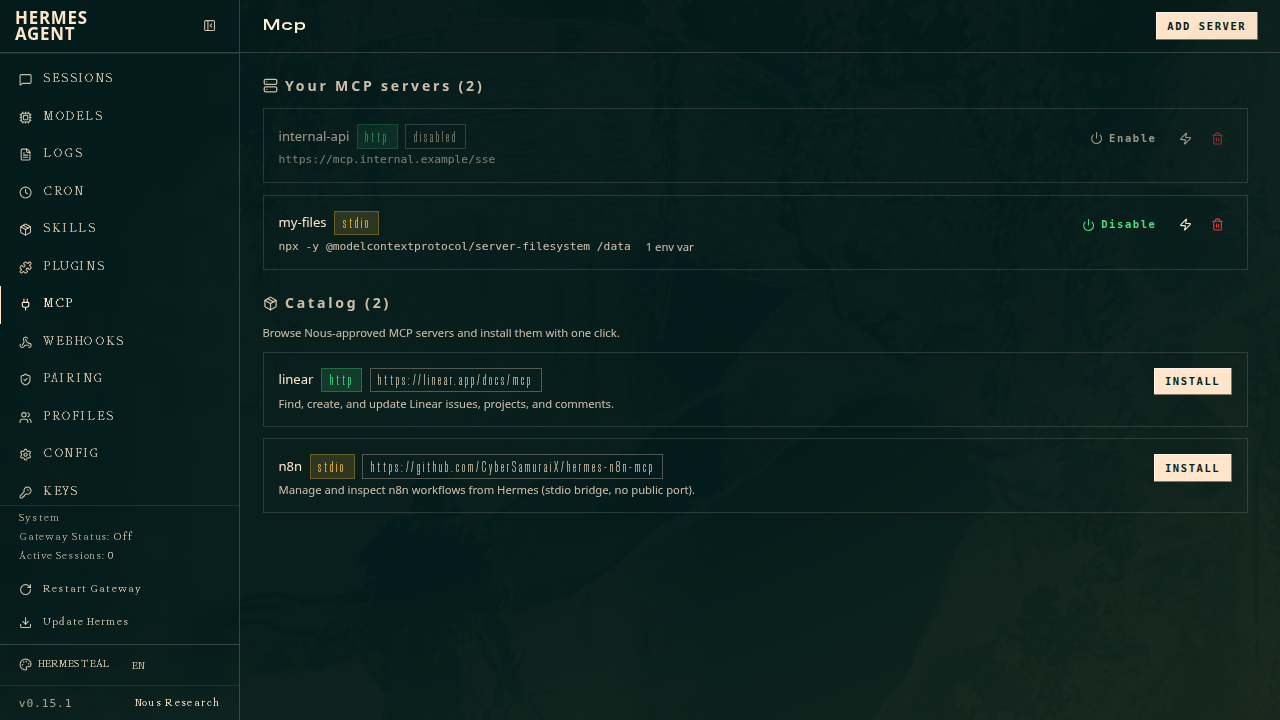
Plugins are code extensions: tools, hooks, memory providers, platforms. The plugin catalog had 571 entries that day, each pinned to a commit. Run hermes plugins search, hermes plugins browse, or hermes plugins install. Plugins install disabled. Being in the catalog does not mean the code was audited. Source: Plugins.
In the room, show the Skills Hub, live-install one MCP, and run one skill. Split models gets the minute before this, 24 to 25. Profiles, each with its own model.
Ten examples that already appear in the official repo, useful for educators and school leaders:
google-workspace: Gmail, Calendar, Drive, Docsteams-meeting-pipeline: meeting notes and actionsnotion, or the Notion MCP: board notes and action itemscanvas: Canvas LMSpowerpoint,docx, andpdf: decks, memos, and packetsgrounded-citationsandarxiv: research briefs with sourcesyoutube-content: a video summaryrss-feedsandblogwatcher: a news watchsocial-media-content-calendar: a communications calendar- MCP catalog names include
canva,gamma,microsoft-learn,calendly,fireflies,todoist,asana, andmonday
Where the walk ends
Watch. This is the map of the system I run, not the homework.
Minutes 27 to 30. This diagram is the end state as of October 12, 2026. It replaces any earlier graphic of the same system.
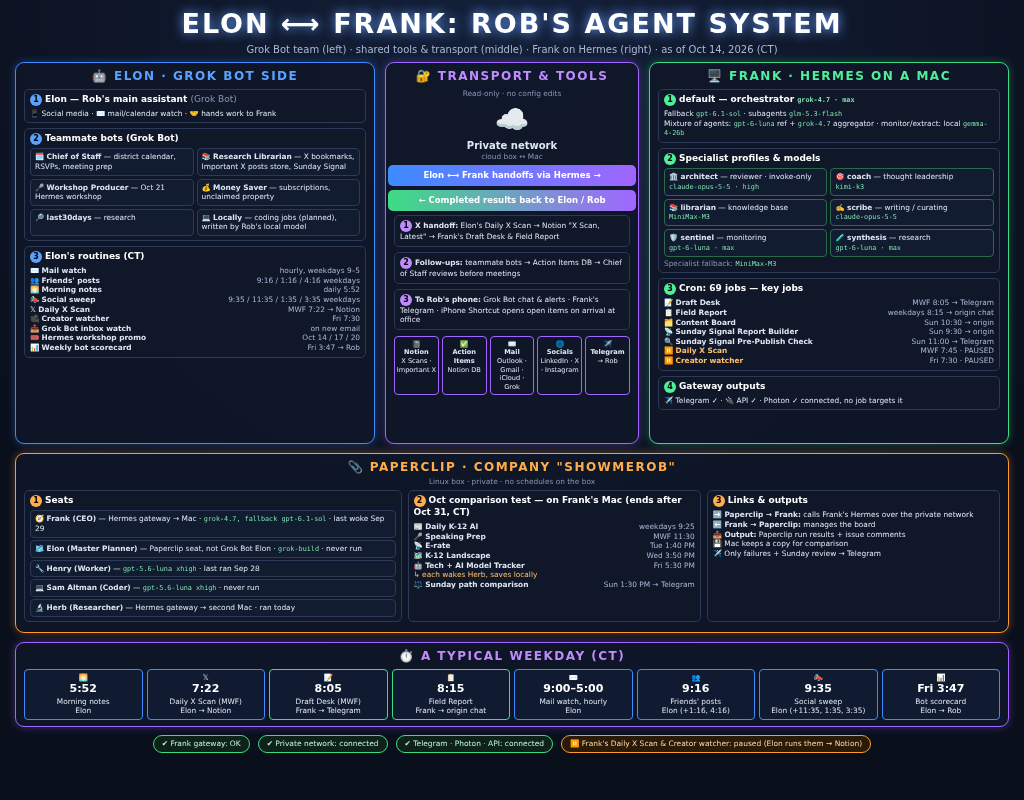

Four layers, in the order we add them. You can leave with the first four stages running. The last stages are the map of the system I run now.
Elon and the teammate bots
Elon is the main assistant on the other machine. The teammates are Chief of Staff, Research Librarian, Workshop Producer, Money Saver, last30days, and Locally.
Routines on that side: mail watch, friends' posts, morning notes, social sweep, Daily X Scan, creator watcher, workshop promo, and a weekly scorecard.
The private network and the shared tools
Tailscale connects the two machines. They hand work across Hermes, and the result comes back. They do not share a brain.
Shared tools: Notion for X scans and action items, mail across Outlook, Gmail, and iCloud, LinkedIn and X, and Telegram on my phone.
Frank
Frank is the default orchestrator on grok-4.7. Six specialist profiles sit beside him. Routes checked October 12, 2026.
- Frank, default: grok-4.7
- architect: claude-fable-5-1
- coach: kimi-k3
- librarian: MiniMax-M3
- scribe: claude-opus-5-5
- sentinel: gpt-6-luna
- synthesis: gpt-6-luna
66 scheduled jobs that day: 56 active, 7 paused, 3 finished. The count moves. In the room I will name four: Draft Desk, Field Report, Content Board, and Sunday Signal. The rest are collectors, maintenance, and work that does not belong on a public page.
Results come back through Telegram, an API server, and Photon. Photon is the other phone channel.
Paperclip
Paperclip is a company layer on a separate Linux machine. The company is named Showmerob. Seats: Frank as CEO, Elon as planner, Henry as worker, Sam as coder, Herb as researcher. October is a comparison test between that company and the Hermes path. The test is dated to end with the month.
A weekday
- Before 7. Collectors write locally. Most of them stop there.
- Around 8. Field Report and morning notes reach the phone.
- Through the day. Mail is watched. Replies stay drafts. Draft Desk prepares posts and waits.
- Late afternoon. Meeting follow-through is written down. It is not sent.
- Sunday. Sunday Signal is drafted. Content Board comes after. Nothing publishes until I say so.
What you leave with
Tick these before you leave. The rest of the page is still here if you want it.
- A chat that replies.
- A soul file you edited.
- One procedure.
- One quiet job, if you had time.
- You did not post, send, or buy anything.
A tips sheet
Do not start here.
This is not the walk. It is a sheet of Hermes tips from witcheer, posted under Hermes Watcher. Read it after the half hour, not during it.
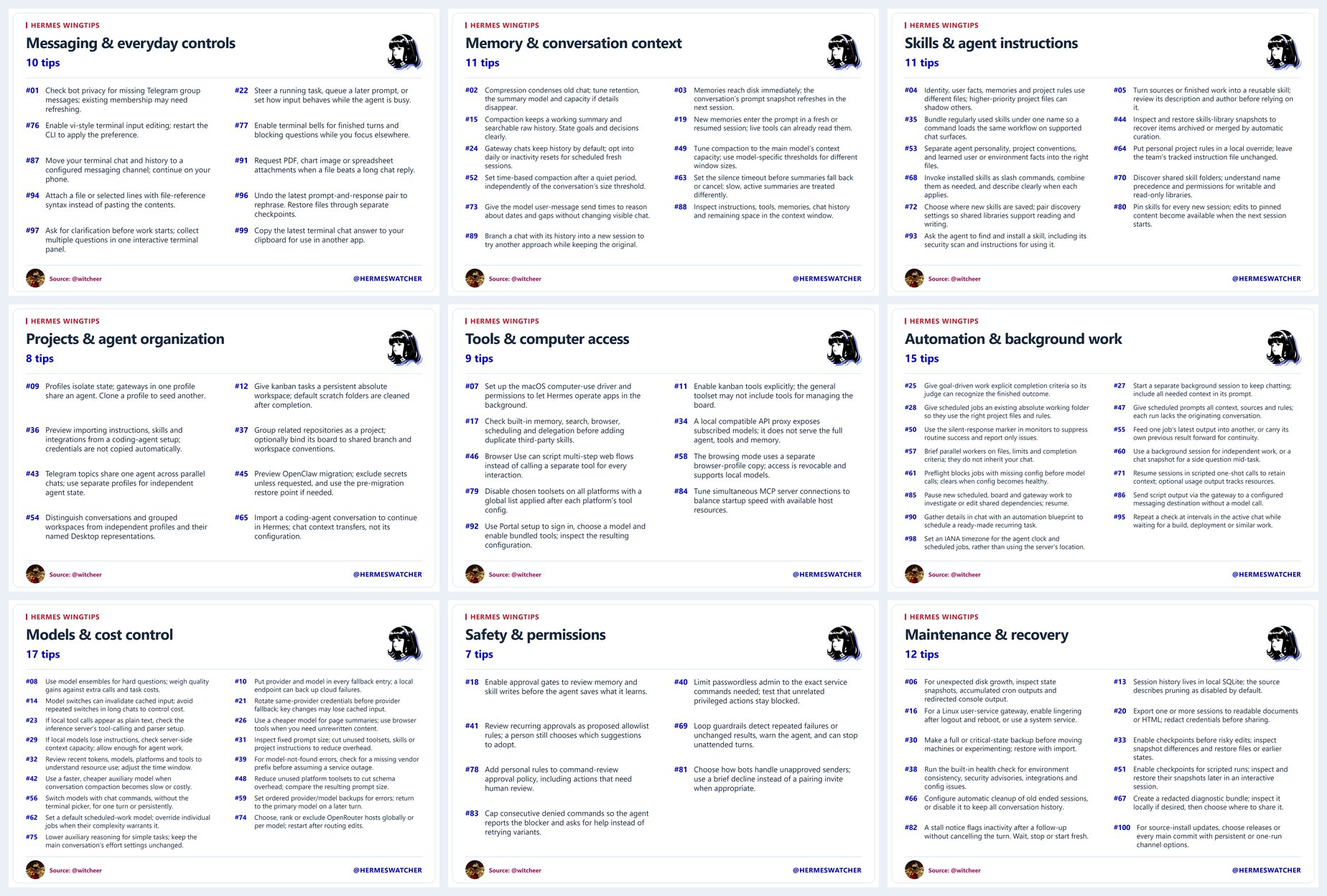
The longer Frank map is on the Frank setup page.
Groover Labs is at 334 N. St. Francis Ave, Wichita. The Newman Institute for AI and the Common Good is the institute co-hosting the night.
GitHub screenshots on this page are Nous Research, MIT License. Marketing images are linked, not hosted. The tips sheet is not a GitHub screenshot.
Go Deeper
Watch. Do not build this tonight. The extend stage already showed skills, connectors, and plugins. This is how the system I run remembers, and which connectors I leave on. Read it after the half hour.
Memory that survives a new chat
A new chat does not replay the last one. What carries over is a short memory, plus search over old chats when you need one.
Two files load at the start of every chat. One is notes the agent keeps: a convention, a lesson, how the setup works. The other is a profile of you: name, preferences, how you want answers. Both stay short. The published caps are 2,200 characters for the agent notes and 1,375 for your profile. Source: Persistent Memory.
Ask it to remember one preference, then open a new chat. You are done when that new chat knows the fact and you did not retype it. If the memory is full, replace an old line. Research notes do not belong there.
A repeated procedure belongs in a skill. A skill loads only when the task matches, so it does not have to sit in every chat. The short memory is for facts that matter every time.
GBrain, then Obsidian
GBrain is the store for sources: a paper, a transcript, a page you will want again. Memory answers who you are and how you work. GBrain answers what you already read.
I keep one store per kind of note. Research goes to GBrain. Facts about me stay in Hermes memory. The same page does not get written to both.
The pattern under GBrain is Andrej Karpathy's LLM wiki. The model keeps a standing set of notes and updates them when a new source arrives, instead of rereading the raw files on every question. The source I follow is his LLM Wiki. The code is GBrain. The schema that names this pattern is the recommended schema. The public writeup is the LLM Wiki skill.
Obsidian is how I read those notes. Download: Obsidian. The knowledge base writes the markdown. Obsidian opens the same folder. I do not keep a second copy by hand. If a page is wrong, fix it in the knowledge base. The notes app follows. Hermes documents that notes integration as a skill: Obsidian skill.
You are done when a new chat can find one saved source, and you can open that same note in Obsidian.
Skills I use
Watch. Do not build this tonight. A skill is a written procedure the agent loads when the task matches. These are the public ones I actually run, each with its official page. Counted Oct 14, 2026: 142 skills installed, 21 with a public Hermes page. The other 121 are private or custom and stay off this page.
- hermes-agent: Configure and extend Hermes.
- github: Issues, pull requests, and reviews.
- systematic-debugging: Find the cause before changing the code.
- test-driven-development: Write the failing test first.
- requesting-code-review: Review a change before you commit it.
- subagent-driven-development: Split a plan across subagents, then review.
- email-inbox-triage: Sort a mailbox and draft replies.
- meeting-action-items: Turn notes into decisions, owners, and tickets.
- grounded-citations: Tie a claim to a source you can open.
- docx: Read and edit Word files.
- pdf: Read, merge, and edit PDFs.
- xlsx: Read and edit spreadsheets.
- maps: Places, routes, and timezones from OpenStreetMap.
- xurl: Read and post on X from the terminal.
- reddit-reading: Read Reddit threads without opening a browser.
- rss-feeds: Read a feed, or find the feed behind a page.
- blocked-page-recovery: When a page fetch fails, try another way in.
- archify: Interactive diagrams that check their own structure.
- sketch: Two or three throwaway HTML layouts to compare.
- creative-ideation: Generate options with a named method.
- mono-color: One-ink or two-ink poster images.
Search
Watch. Do not build this tonight. Web search on this setup uses Perplexity. It is good when you need a current public page, with a date, and you do not already have the URL. Saved notes stay in memory or the knowledge base.
Full-page extract is separate. Search is Perplexity. Extract is Firecrawl. Perplexity finds the page. Firecrawl pulls the text.
Hermes setup: Web search. Perplexity's search docs: Search quickstart.
Connectors I leave on
A connector, called MCP, lets the agent use another app. Turn one on. Confirm it can read something you already have. Then stop.
What I leave on:
- Notion: research pages and a daily store a person can open. GBrain is the search notebook. Notion is the page.
- Apple Mail: find a thread instead of pasting it.
- Apple Notes: find a note already on the Mac.
- Wispr Flow: a meeting transcript, and the calendar event it belonged to.
- Apple Photos: find a picture in the library when a post needs one.
- Apple Numbers: read a table in a spreadsheet you already have.
Add these later, one at a time, if you want them:
- Calendar: see what is next without pasting the day.
- Email, if mail is not connected yet: find a thread by sender or subject.
- Drive or Docs: read a shared file without downloading it first.
- GitHub: open an issue or a pull request you already have.
You are done when one connector returns a real item from your account. You did not post, send, or buy anything.